
 Vitalii Holben
When layout shifts break your price monitoring: a real Amazon tracking story
Today we're sharing another pain point we ran into. This time while trying to monitor price changes on an Amazon product page. We've written before about tracking SaaS pricing pages, and those are usually straightforward because the layout is static and the content is predictable. Amazon turned out to be a completely different beast. The setup itself was standard: we added the URL, set the capture interval to every 6 hours, configured the sensitivity threshold, and started waiting. The first day looked perfectly fine with no changes detected, so we figured the whole thing took five minutes and we could just forget about it.
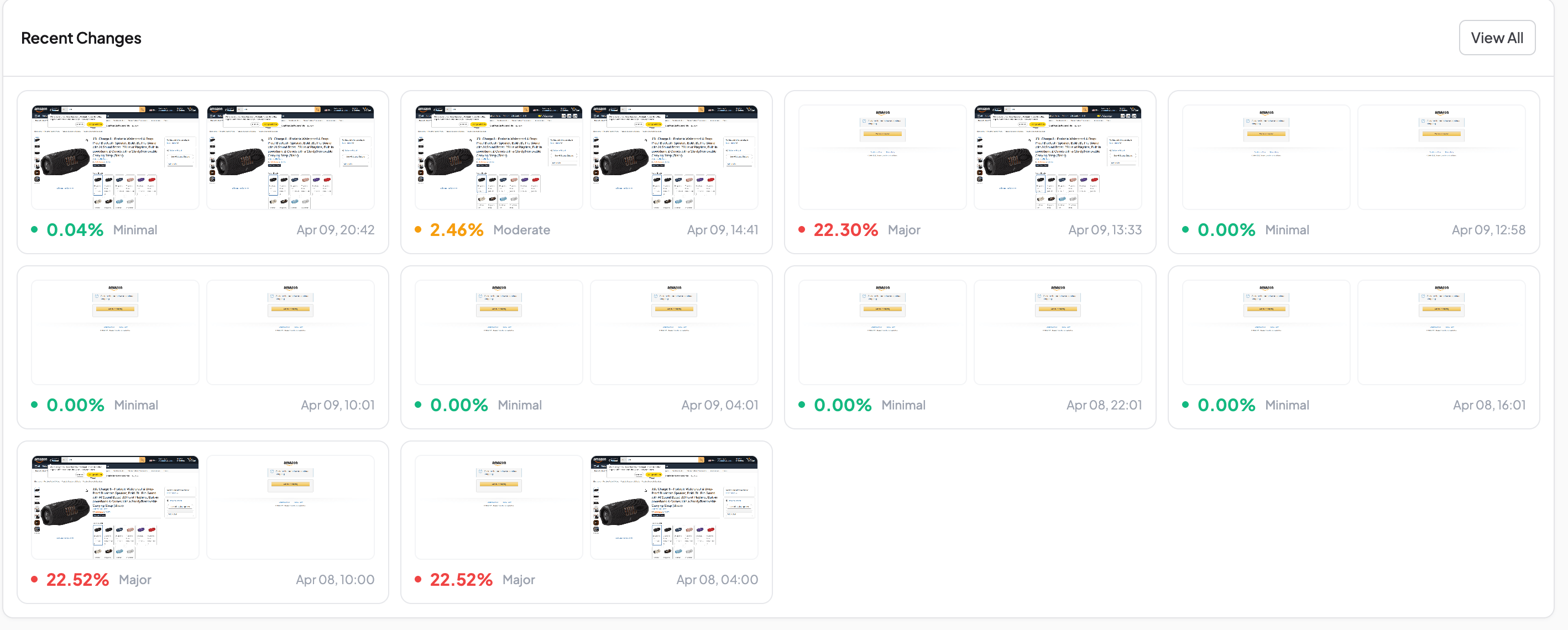
On the second day, an alert came in: 22.52%, Major.
We opened the diff overlay and for a moment thought Amazon had completely redesigned the product card, because the entire page was covered in red, the product title, the image, the rating, the color options, all highlighted as if everything had changed at once.
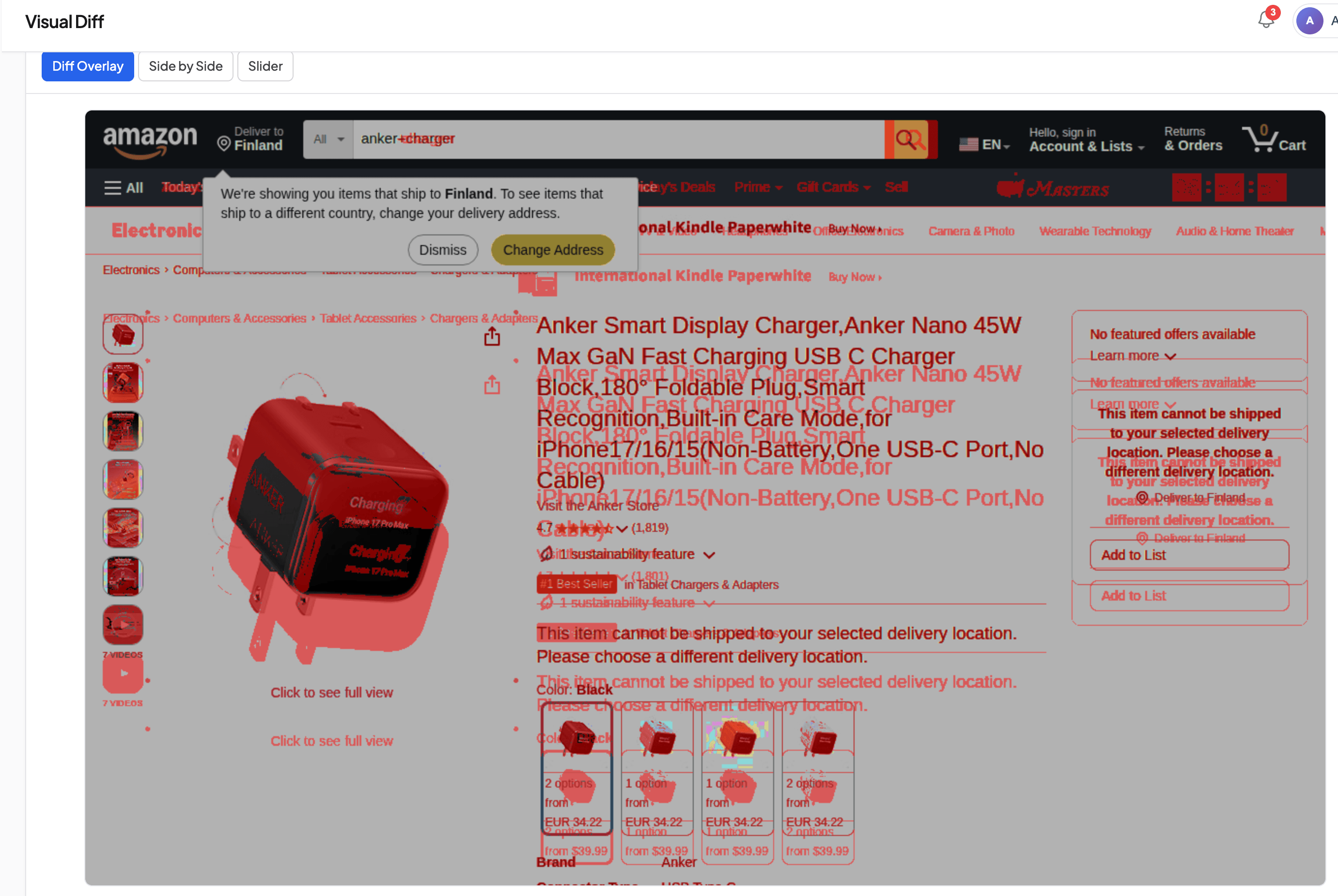
But something felt off. A 22% diff is a serious change, yet the page looked oddly familiar. So we switched to slider mode, dragged the handle back and forth. And immediately saw what was going on. The content was exactly the same: same price, same product image, same number of reviews. The only difference was that everything had shifted down by a few dozen pixels, as if someone had inserted an invisible strip at the very top of the page and pushed the rest of the layout along with it.
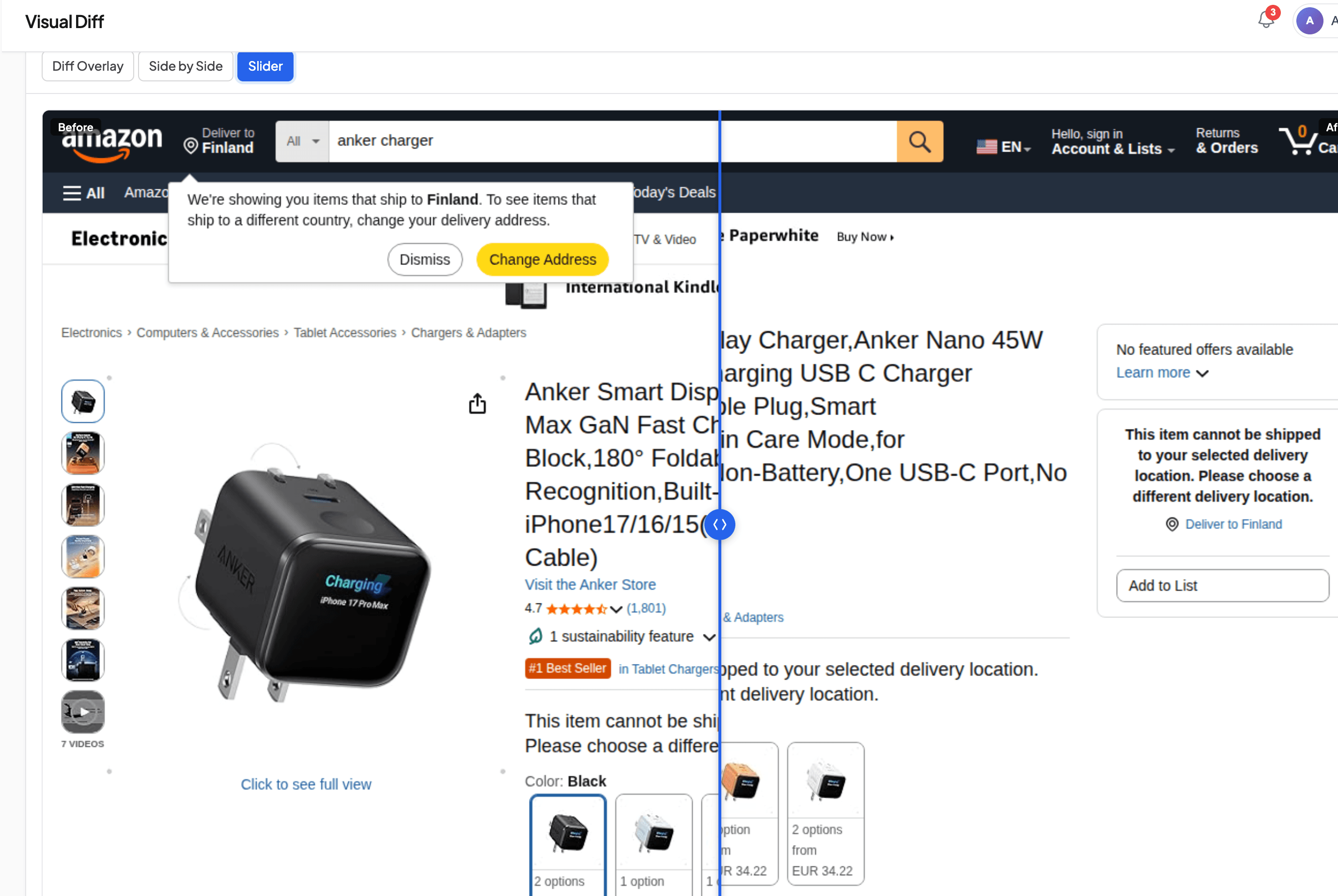
We found the cause quickly. Amazon occasionally adds an extra promotional row to the navigation (ad links, category recommendations, that sort of thing) and it doesn't show up on every visit, it just comes and goes. When that row is there, all the content below it shifts down, which makes pixel-by-pixel comparison go haywire because every element on the page ends up in a " New" Position even though nothing actually changed.
On top of that, there was another annoyance layered in. A popup suggesting we change our delivery region. It doesn't appear every time either, and when it does pop up, it covers part of the product card and adds yet more noise to the diff.
Over two days of monitoring, our change history ended up looking something like this: several zeros in a row, then a sudden jump to 22%, back to zeros, another spike to 22%, then a smaller 2.46% blip. All these wild swings happened while the actual price on the charger hadn't changed once.
If you want the full picture on false positives (threshold tuning, hide selectors, noisy page types) we wrote a whole article on that. And for popups specifically, there's our click selector guide that walks through the setup. We won't rehash the mechanics here, but this particular case left us with a pretty clear takeaway.
What we learned about monitoring complex pages with unstable layouts
If you're planning to monitor product pages on marketplaces (or any page where the layout tends to shift around) the first few days need a different approach than usual. Capture more frequently, every 2–4 hours instead of once a day, and check every alert manually. Don't rely on diff overlay during this phase because it'll just be a wall of red that tells you nothing useful, use slider or side-by-side instead, since your eyes can instantly tell whether the content actually changed or the layout just moved.
Once you've collected all the " Floating" Elements (promo banners, geolocation popups, notification bars, recommendation blocks) add them to hide selectors so they stop triggering false diffs. We've already put together selectors for the most common cookie banners, and if you need help finding the CSS class of any specific element, we described that process in our visual diff article. After this break-in period, the diff will start catching what you actually set out to track, real price changes, not layout jumps caused by a banner that appears whenever it feels like it.
If you're just getting started with website monitoring and want to skip the 22%-alert panic we went through, budget a couple of days for this calibration phase upfront. It feels a bit tedious in the moment, but once it's done you stop thinking about it. And the alerts you do get are the ones that actually matter.
Start archiving websites today
Free plan includes 3 websites with daily captures. No credit card required.
Create free account
Ad Landing Page Screenshots for FTC Compliance
The FTC investigates ad claims retroactively. By the time they look, your landing page has changed. Automated screenshots with timestamps create a record of what you published and when.

The Deploy That Broke Our Hero Section for 63 Hours
We pushed a one-line CSS fix on a Friday, closed our laptops, and didn't realize the hero section was broken until Monday. Every automated test had passed.

Website Screenshot Retention: How Long to Keep Screenshots and Why It Matters
How long should you keep website screenshots? It depends on your industry, your use case, and the regulations that apply to you. This guide covers retention periods for financial services, healthcare, e-commerce, SaaS, and more — with storage cost estimates and a checklist for building a retention policy.