
Website evidence capture with court admissible screenshots
A competitor copies your product description word for word. You screenshot the page, email it to your lawyer, and assume you have evidence. Two months later, the competitor edits their site. Your lawyer asks for proof of what the page showed on the original date. You open the screenshot: no URL, no timestamp, no metadata. Just a PNG that could have been edited in Photoshop five minutes ago. That's not evidence. That's a picture. And it's why website evidence capture matters more than most people realize.
Courts have rejected website screenshots for exactly this reason. In Moroccanoil v. Marc Anthony Cosmetics, the court questioned screenshots lacking proper authentication. Under Federal Rule of Evidence 901(a), the party presenting digital evidence must demonstrate it "is what its proponent claims." A bare screenshot, with no timestamp, no URL in the metadata, and no digital evidence chain of custody, fails that test every time.
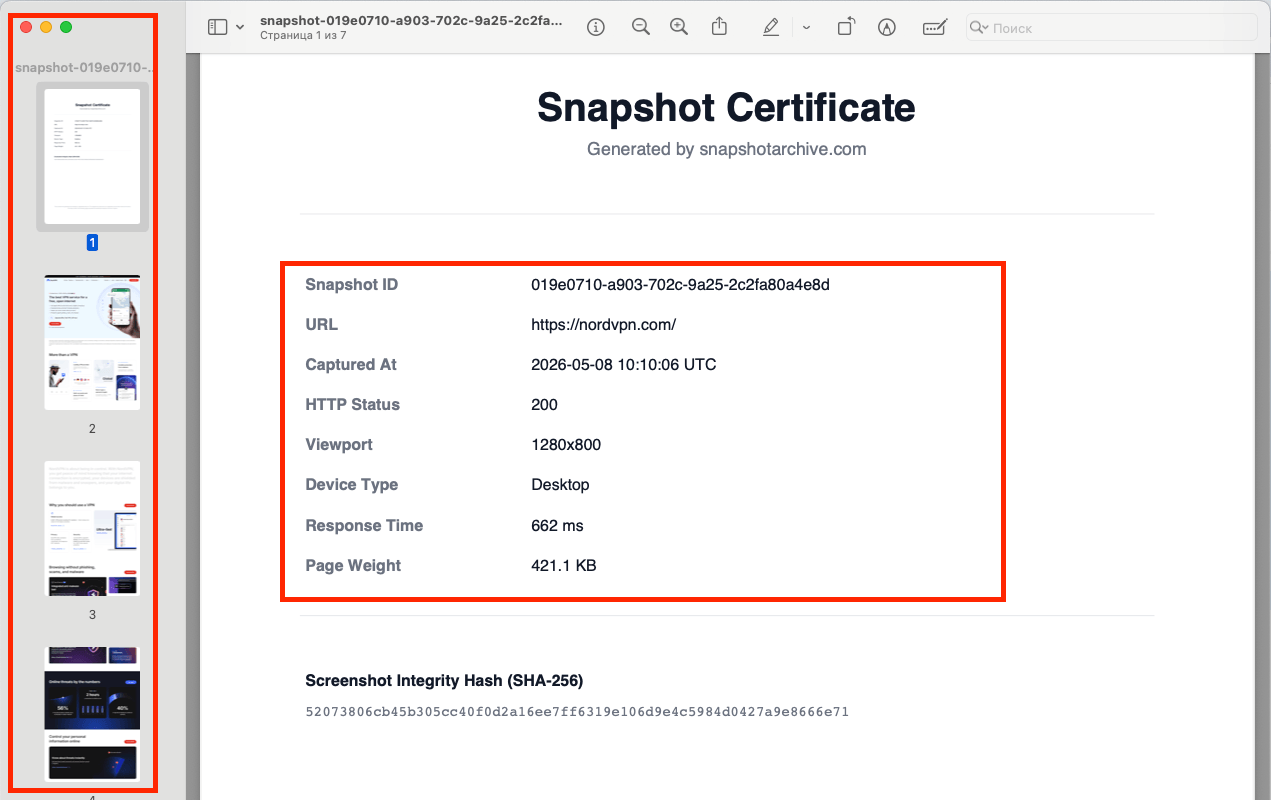
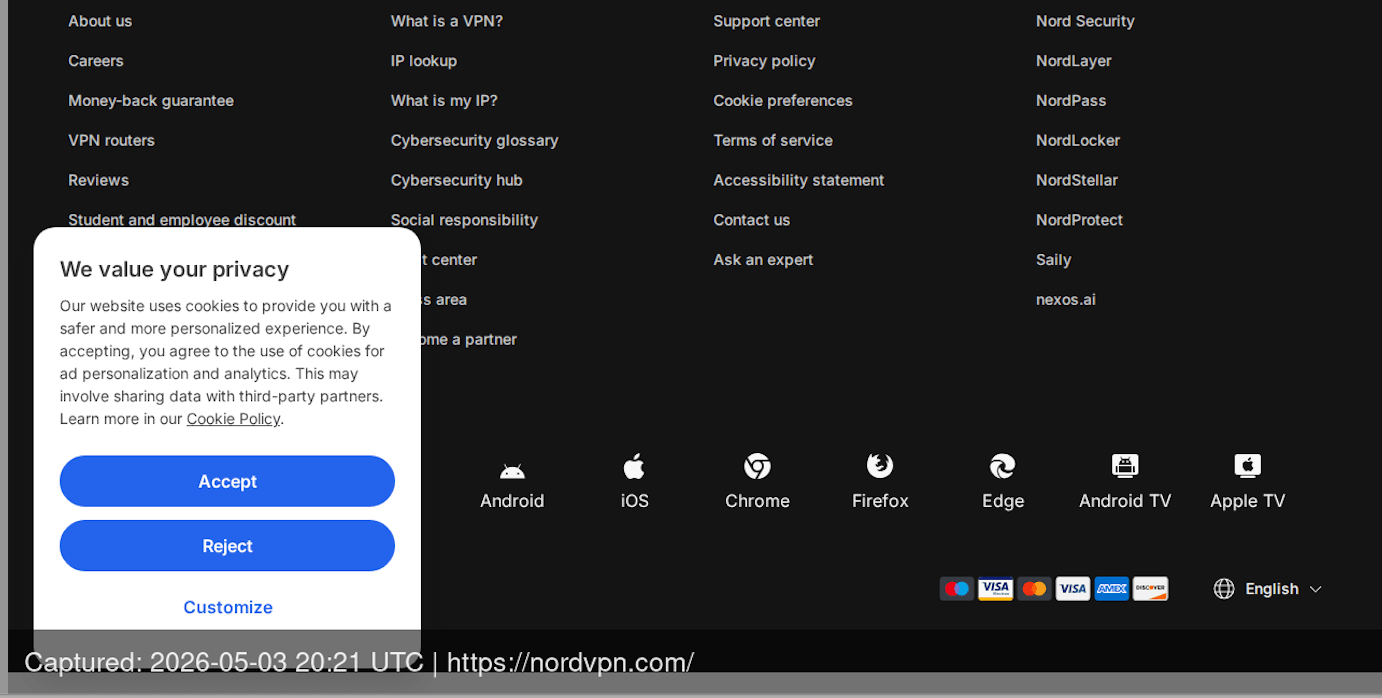
I built Snapshot Archive as a website evidence capture tool that produces evidence-grade screenshots from day one. Scheduled screenshots run on a fixed cadence, capturing pages with a timestamp and URL watermark burned directly into the image. When you need to produce that evidence, PDF evidence exports include a SHA-256 hash certificate proving the file hasn't been altered since capture. The result is a record that holds up when opposing counsel challenges it.
Why courts reject most website screenshots
Courts accept digital evidence regularly. The issue is never the format: it's whether the evidence can be authenticated.
Three things trip people up. First, there's no verifiable timestamp. A screenshot file's "date created" metadata is trivially editable. Second, the URL isn't embedded in the image. Anyone can screenshot a page, crop out the browser chrome, and claim it came from any website. Third, there's no chain of custody. Nothing proves the image hasn't been modified between capture and courtroom.
The Sedona Conference, one of the most influential legal bodies on electronic evidence, has noted that ordinary screenshots tend to produce incomplete data captures that are difficult to authenticate beyond a witness's personal recollection of what they saw. That personal-knowledge standard means someone has to testify they took the screenshot, they remember what the page showed, and they didn't alter it. Good luck with that six months after the fact. This applies to any visual evidence — from trademark disputes to GDPR cookie banner compliance proof and MAP pricing violation enforcement.
Federal Rule of Evidence 902(13), added in 2017, offers a better path. It allows self-authentication of electronic evidence through certified records generated by an electronic process, including cryptographic verification. A screenshot bundled with a SHA-256 hash certificate supports authentication under this framework by establishing that the file has not been altered since capture. A qualified person still needs to certify the process, but the hash provides the cryptographic foundation.
What makes website screenshots legally defensible
Defensible evidence needs four layers, and each one matters independently.
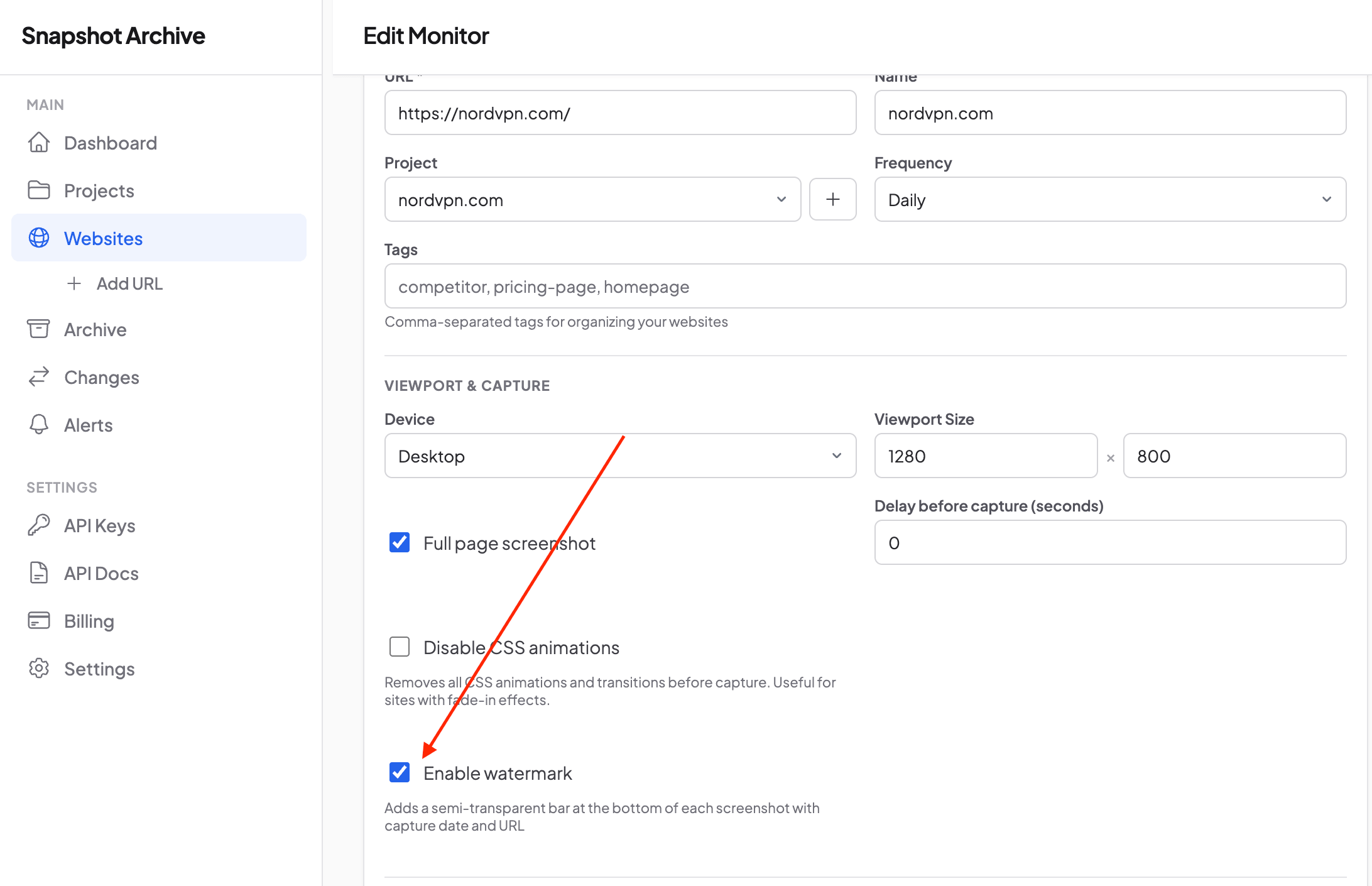
Embedded provenance. The capture timestamp and source URL need to be part of the image itself, not just file metadata that any editor can rewrite. Watermarking embeds this directly in the image, so the provenance data travels with the file regardless of how it's shared.
Cryptographic integrity. A SHA-256 hash calculated at capture time creates a fingerprint of the file. Any modification, even a single pixel, produces a completely different hash. When you present the PDF in court, opposing counsel can verify the hash independently. If it matches, the file is authentic. There's no gray area.
Courts also give more weight to evidence from a systematic, automated process than to a single capture taken ad hoc. Regular captures show when content changed, which is often as important as what the content was. And because the page is rendered server-side (not in a browser where someone could edit the HTML in DevTools) the "was this page real?" question never gets asked.
How to set up evidence collection with Snapshot Archive
Identify the pages that matter
Start with the pages most likely to change or disappear: competitor product pages where you suspect infringement, opposing party websites in active litigation, vendor terms of service that affect your contracts, and any page where the content itself is the dispute. If you're tracking multiple pages across a case, group them in a project so your website evidence capture archive stays organized by matter.
I wrote a practical guide on which competitor pages to monitor, the same selection logic applies when building an evidence archive. For legal evidence, focus on pages where the content is the claim, the offer, the price, or the representation you need to prove existed.
Set capture frequency to match your evidence window
Daily captures work for ongoing monitoring: tracking a competitor's advertising claims over time, preserving evidence of regulatory compliance, documenting changes to terms of service. If you're in active litigation and the opposing party is actively editing their site, hourly captures close the gap.
Full-page screenshots capture everything from header to footer. This matters in legal contexts because a viewport screenshot that cuts off a disclaimer at the bottom is incomplete evidence. Defense counsel will argue you selectively captured only the portion that supports your case. Full-page capture removes that argument entirely.
Enable watermarks on every monitor
The watermark feature stamps each screenshot with the UTC capture timestamp and source URL directly on the image. This is the single most important setting for legal evidence. Metadata can be stripped from a file, but a watermark burned into pixels cannot. Enable it on every monitor intended for evidence collection.
Export PDF evidence packets when you need them
When a matter moves forward, export the relevant snapshots as PDFs. Each export includes the screenshot itself plus a Snapshot Certificate page showing the capture timestamp, URL, HTTP status code, viewport dimensions, and SHA-256 integrity hash. The SHA-256 hash on each certificate is independently verifiable: opposing counsel can confirm the file hasn't been modified, consistent with FRE 902(13) authentication principles.
Use visual diff to document changes over time
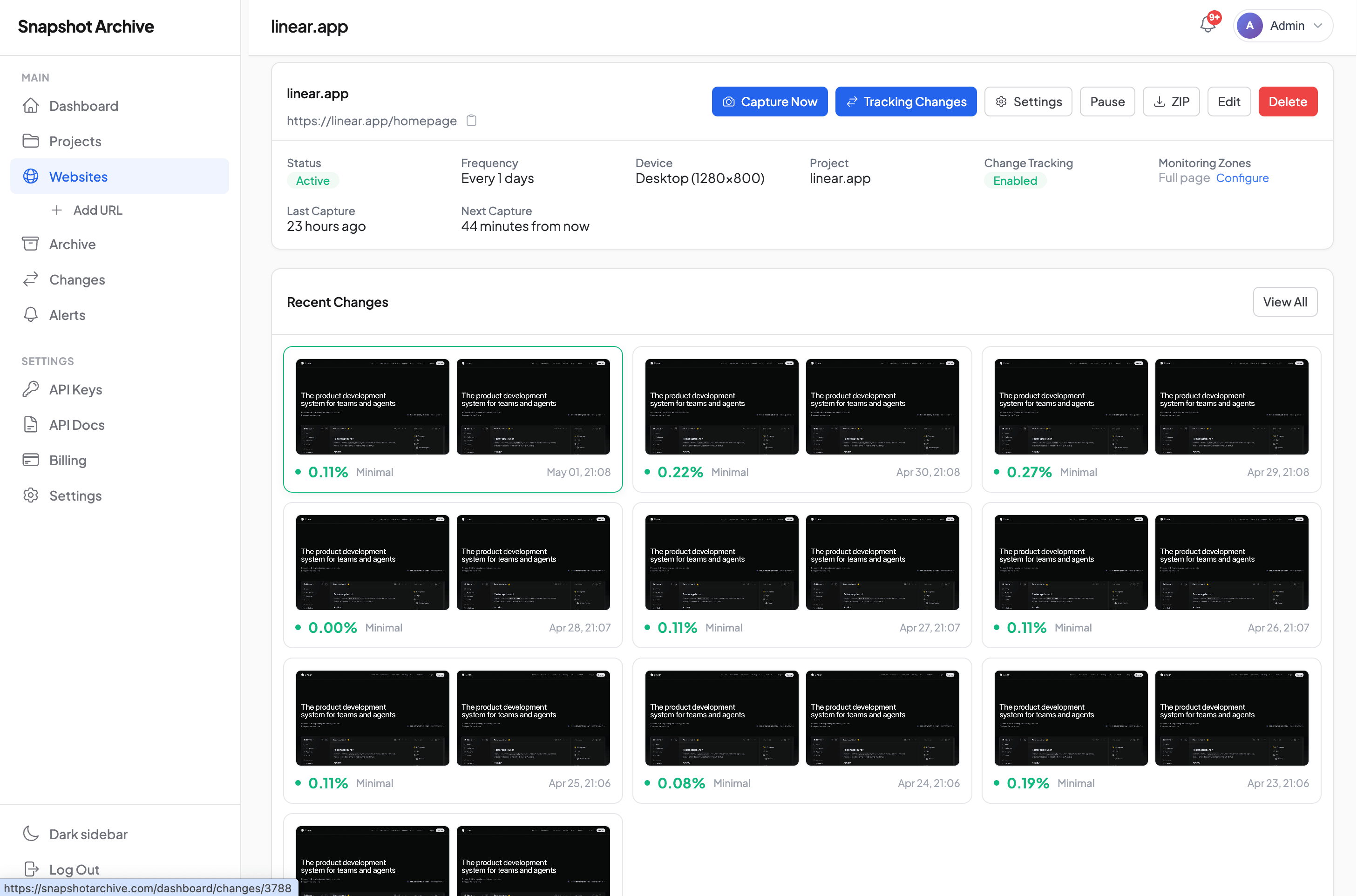
Evidence isn't always about what a page shows right now. Often, the critical fact is that the page changed: a competitor removed an infringing image after your cease-and-desist, a vendor quietly altered their terms of service, a counterparty edited a pricing page after a contract dispute.
The visual diff highlights exactly what changed between any two captures, pixel by pixel. Combined with change alerts, you'll know within hours when a monitored page is modified, often before the content is further modified or removed entirely.

Scenarios where website evidence decides the outcome
Intellectual property disputes. Trademark infringement, copyright violations, counterfeit product listings. The infringer's first move is always to take down the offending content. Without an archive, you're left arguing what the page used to show. With timestamped captures running daily, you have a visual record of every version of the infringing page, with dates. Legal firms using Snapshot Archive for evidence tend to start monitoring before sending the cease-and-desist, so they've already documented the infringement when the other side claims it never existed.
MAP and reseller violations. Manufacturers set minimum advertised prices, and resellers violate them constantly. The violation is often a brief sale event or a dynamically generated price that doesn't appear in the HTML source. A daily screenshot of the product page catches the violation as it happens. I covered the visual approach to price tracking in a detailed post on ecommerce price monitoring.
When a vendor changes their cancellation policy, refund window, or liability limitations, and you weren't archiving the page, you have no proof of what the old terms said. The terms and privacy tracking use case covers this workflow. For legal evidence specifically, timestamped screenshots plus visual diff give you both the before and after, with dates. Similarly, compliance archiving addresses the proactive side. Building the record before a dispute exists.
Insurance claims and fraud investigation. A business advertises a service level or safety certification on their website, then removes the claim after an incident. An insurer investigating needs proof of what was represented. Timestamped captures of the business's website before and after the incident establish what was publicly stated and when it changed.
Website evidence capture tools: Snapshot Archive vs. Forensic alternatives
There are tools built specifically for forensic web evidence. Page Vault charges $195 per month and up, targeting litigation teams who need affidavit-ready evidence packages. For forensic methodology, there's TrueScreen: it follows ISO/IEC 27037 standards with qualified timestamps under the EU's eIDAS regulation. ProofSnap takes a different approach and anchors hashes to the Bitcoin blockchain.
These tools exist for a reason. If you're producing evidence for a high-stakes federal case and opposing counsel has a forensics expert ready to challenge every byte, a dedicated forensic-grade legal web evidence tool is the right choice.
But most legal evidence scenarios don't require that level. A trademark dispute where you need to prove a page existed. A vendor dispute where you need the old terms of service. A compliance audit where a regulator wants to see what your site showed last quarter. For these, authenticated screenshots with SHA-256 certificates are typically sufficient and cost a fraction of what forensic tools charge.
The post on screenshots as legal evidence covers the specific admissibility standards under FRE 901 and eIDAS in more detail. Short version: for the vast majority of website evidence needs, authenticated web screenshots with proper metadata and cryptographic verification are enough.
Start your website evidence capture today
Add the first page you need to monitor. Enable full-page capture so nothing gets cropped out. Turn on watermarks. Set daily captures. That monitor will start building a timestamped, hashable visual record immediately.
When you need to produce evidence, export the relevant snapshots as PDFs. Each one carries its SHA-256 certificate. It's timestamped, hashed, and a lawyer can verify it without calling you as a witness.
The free plan covers three URLs. That's enough to archive a competitor's infringing page, their terms of service, and one more page relevant to your matter. Export your first PDF, check the Snapshot Certificate with its integrity hash, that certificate is the difference between a picture and evidence.
Start archiving websites today
Free plan includes 3 websites with daily captures. No credit card required.
Create free accountFrequently Asked Questions
Chain of custody is the documented history of who had access to a piece of evidence and what happened to it at each stage — from creation to courtroom. For website screenshots, this means proving the file went from capture to storage without being modified. Automated cloud-based capture with server-generated timestamps and access logs establishes this chain without relying on a person's memory.
Daily captures cover most ongoing monitoring needs: competitor advertising, vendor terms of service, regulatory compliance pages. Switch to hourly captures during active litigation if the opposing party is likely editing their site. The key is consistency — courts give more weight to evidence from a systematic, automated process than to a single screenshot taken after a problem is discovered.