
Website archiving for marketing agencies
We polled twelve agency owners last month about how they track changes on client websites. Nine said "we don't, unless someone notices." The other three described manual processes involving browser bookmarks, a shared Google Drive folder, and one person who emails herself screenshots from her phone. None of them had a systematic archive. The kind that website archiving for marketing agencies is built to provide. All of them had lost a client argument at some point because they couldn't prove what a page looked like on a specific date.
We hear versions of this often enough that we stopped being surprised. Agencies operate in a strange position: they build and optimize pages they don't own, for clients who can change anything at any time, on domains the agency has limited access to. When something goes wrong, the agency is expected to explain what happened and when. Without a visual record, that explanation becomes a guessing game.
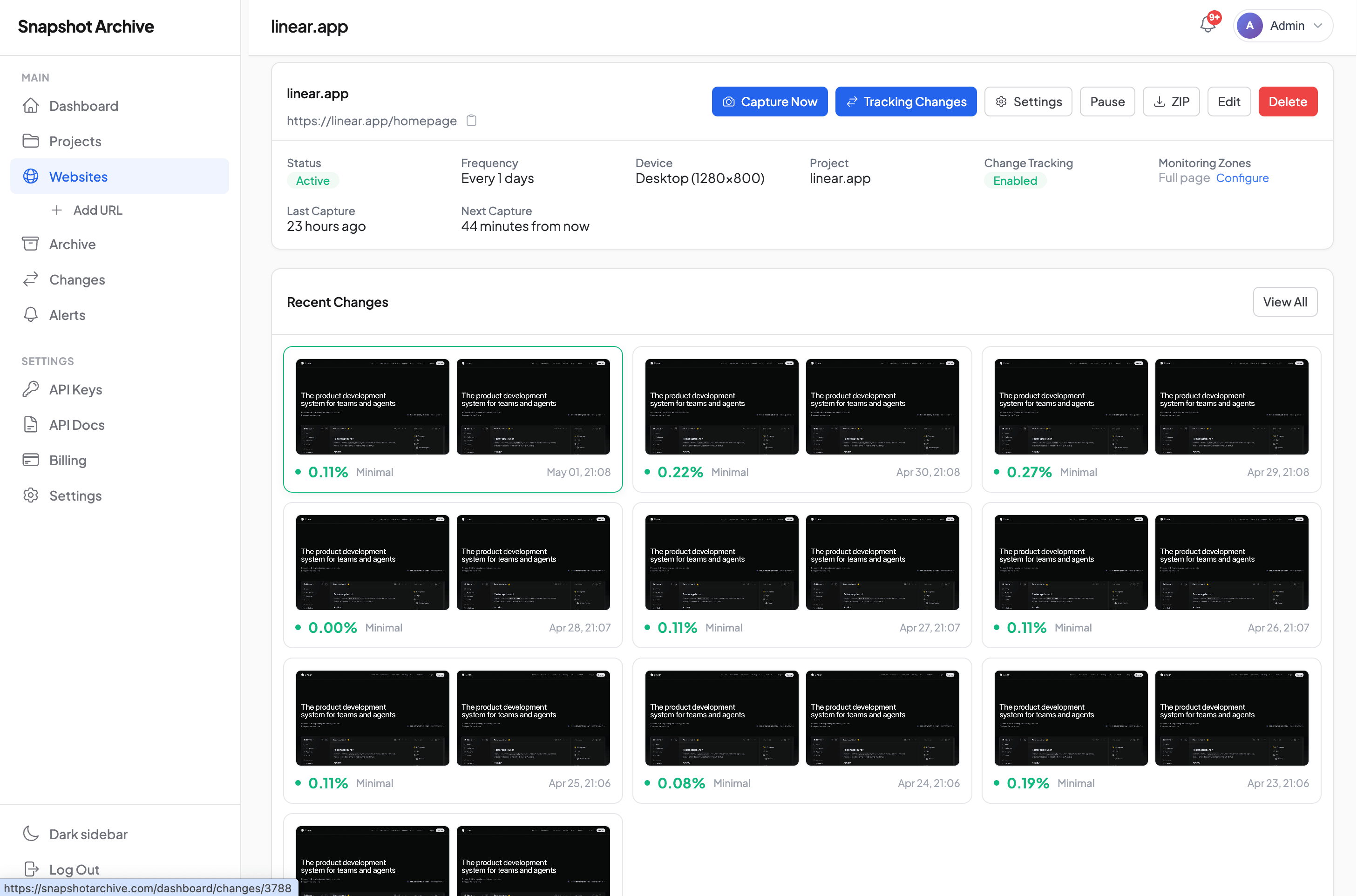
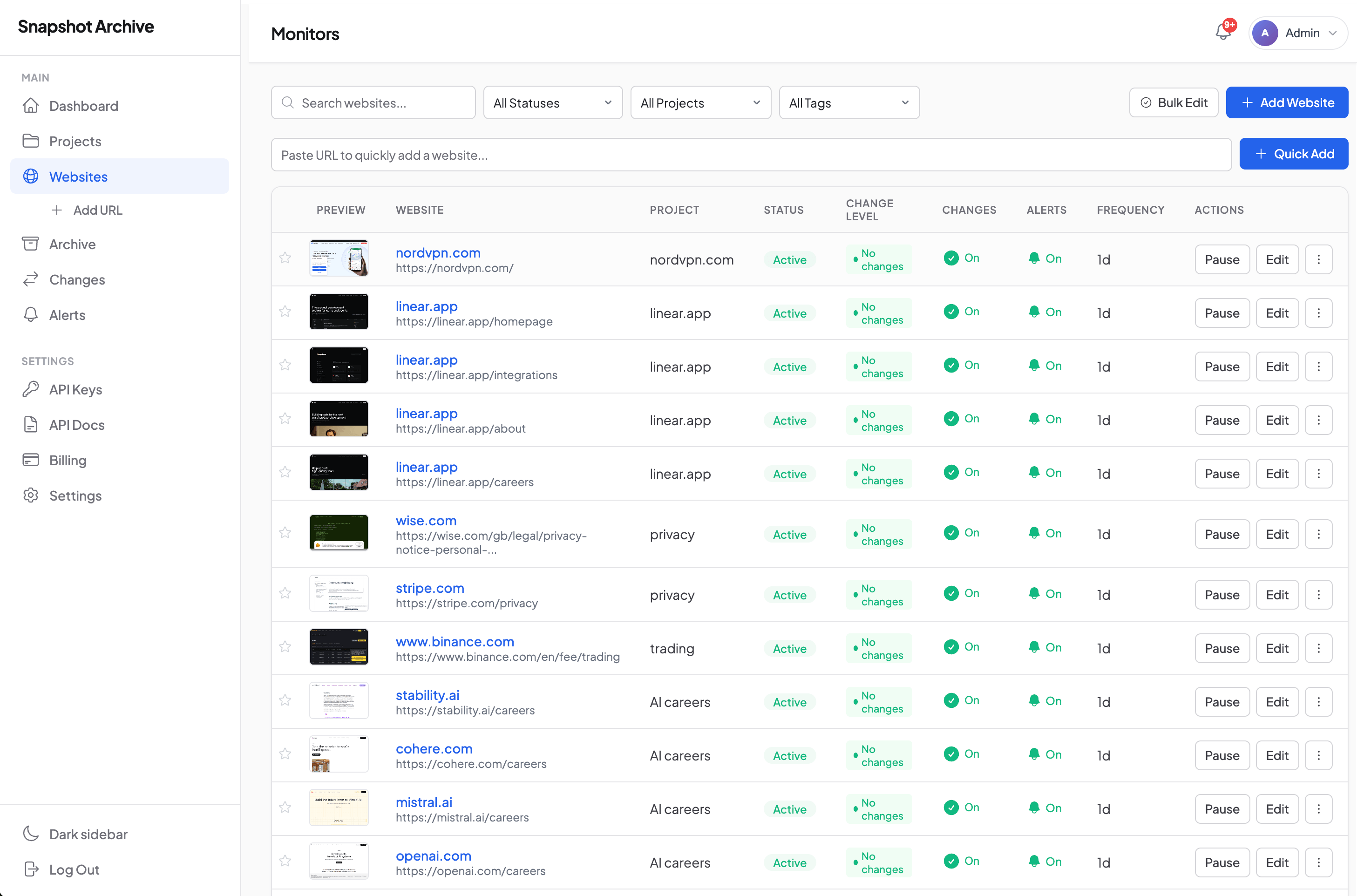
Snapshot Archive exists to make that record automatic. We built a website archiving tool, and while we didn't design it exclusively for agencies, the multi-site monitoring structure fits the way agencies actually work: across dozens of client domains, each needing its own capture schedule and alert settings.
The portfolio problem nobody talks about
Most website monitoring tools assume you care about one site. Your site. The entire interface, pricing model, and alert logic reflects that assumption. Agencies don't work that way. A fifteen-person agency might manage websites for twenty or thirty clients. Some of those clients are on retainer. Others are project-based, with a defined scope that ended months ago but the agency still gets calls when something looks off.
We went with a per-site monitoring model because we'd seen agencies try to shoehorn multi-client tracking into tools built for single-company use. The result is always the same: one login, one alert inbox, no way to separate Client A's landing pages from Client B's product catalog. With scheduled screenshots, each client domain gets its own capture frequency, daily for active campaigns, weekly for maintenance-mode sites.
That separation matters more than it sounds. When a client asks "what did our pricing page look like on March 3rd?", you need to pull that specific archive without scrolling through hundreds of captures from other accounts.
What agency teams actually need archived (and why most skip it)
Campaign landing pages are the obvious one. If you're running paid traffic to a page, you need a record of what that page displayed on each day the campaign was active. Not because you're paranoid, but because ad platforms change their compliance rules, clients edit pages without telling you, and conversion rate discussions require knowing exactly what the visitor saw. A screenshot from the day the CPC spiked tells you whether someone swapped the hero image or changed the form fields.
Client homepages and service pages deserve regular captures too, especially for SEO retainers. We've seen agencies lose hours reconstructing what changed on a client's site after an organic traffic drop. Google Search Console shows the decline. The Wayback Machine might have a capture from that month, might not. Having your own full-page screenshots on a predictable schedule removes that uncertainty.
Competitor pages are the third category agencies tend to monitor, but with a twist. Unlike SaaS product teams who track competitors for their own positioning , we cover that use case on our SaaS companies page, agencies track competitors on behalf of clients. A client in the home insurance space wants to know when Lemonade.com updates its quote flow or when GEICO redesigns its landing page. The agency becomes the eyes. Automated captures through Snapshot Archive mean the agency doesn't need to assign a junior team member to manually check five competitor sites every Monday morning.
The fourth category is proof of compliance. FTC guidelines on advertising disclosures, ADA accessibility requirements, terms-of-service updates. If your agency touched a client's website and a regulatory question comes up later, archived screenshots with SHA-256 PDF certificates provide timestamped evidence of what was published and when. We generate those certificates with response time and page weight metadata included (useful during site performance audits too).
FTC disclosures, client contracts, and the paper trail agencies forget to build
Marketing agencies don't face the same regulatory burden as financial services or healthcare. But they're not exempt from documentation obligations either, and the ones that catch agencies off guard tend to be contractual rather than governmental.
FTC endorsement and advertising guidelines require that certain disclosures appear on pages promoting products or services. If your agency manages influencer landing pages or affiliate marketing sites, you need proof those disclosures were present during the campaign period. A screenshot archive with verifiable timestamps is the simplest form of that proof. We should be honest here: our PDF export with SHA-256 certificates provides strong evidence, but it hasn't been tested in court as a primary exhibit. For most client disputes and FTC inquiries, it's more than sufficient. For litigation, consult legal counsel about admissibility standards in your jurisdiction.
Client contracts often contain clauses about deliverable documentation. "Agency will maintain records of all published creative assets" is boilerplate in many master service agreements. Agencies sign these clauses and then promptly forget about them because nobody enforces them: until there's a dispute. Automated archiving covers that obligation without requiring anyone to remember to take screenshots.
State-level consumer protection laws in California (CCPA/CPRA), Virginia, Colorado, and others also create obligations around how websites collect data. If your agency implemented a cookie consent banner for a client, having archived screenshots showing the banner was live on specific dates protects both the client and your agency. We wrote about cookie banner monitoring challenges separately, short version, dynamic consent tools can behave differently depending on visitor location, which means screenshots from one geographic endpoint won't always match what a regulator sees from another.
When a CMS update wiped twelve product pages overnight
Here's a scenario based on patterns we've observed across multiple agency conversations, composited into one narrative.
A healthcare-adjacent agency managed the website for a medical device manufacturer. The site included product pages with FDA-required labeling language. During a routine CMS update pushed by the client's IT department, a template change stripped the "Intended Use" section from twelve product pages. The agency's SEO team noticed organic traffic dropping to those pages about ten days later. By the time anyone checked the pages themselves, the client's IT team had already restored the content from a CMS backup. But there was no record of the ten-day gap when the required language was missing.
With change alerts configured on those product pages, the agency would have received a notification within 24 hours of the template change. The visual diff (which offers Diff Overlay, Side-by-Side, and Slider comparison modes) would have shown exactly what content disappeared. More importantly, the archived screenshots from before and after the change would have documented the timeline for the client's compliance team.
The agency couldn't provide that documentation. The client's legal department was not pleased. That's the kind of relationship damage that a $39/month Pro plan prevents.

How archiving fits into the agency workflow without creating another task
We prefer to be blunt about this: if a monitoring tool requires daily attention, agencies won't use it. Account managers are already juggling Slack channels, project management boards, client calls, and reporting dashboards. Adding "check the screenshot tool" to someone's morning routine is a recipe for abandonment within two weeks.
That's why we built the alert system to be specific enough to act on. Change detection uses three severity levels: minor, moderate, and major. An agency can configure alerts so that minor changes (a footer copyright year update, a font rendering difference) stay quiet, while moderate and major changes trigger email notifications. The goal is signal, not noise. We've written about reducing false positives in screenshot monitoring because we know this is where tools like ours either earn their keep or get uninstalled.
For agencies with development teams or custom reporting workflows, the API (available on Pro plans and above) allows pulling screenshot data into existing dashboards. We've seen agencies pipe change alerts into their project management tools so that a detected change on a client site automatically creates a ticket for the account team. That's the right way to integrate monitoring, not as a separate tool to check, but as an input that feeds your existing workflow.
A realistic agency setup: 25 clients, mixed schedules
A typical agency running Snapshot Archive monitors between 40 and 200 URLs across their client portfolio. Not 200 separate websites. More like 25 client domains with 4-8 key pages each. Homepages, primary service pages, campaign landing pages, contact pages, and one or two competitor pages per client.
Capture frequency varies by client activity. Active campaign clients get daily captures. Retainer clients with stable sites get weekly captures. Former clients where the agency wants to maintain a record (smart, and more agencies should do this) get monthly captures. Alert sensitivity follows a similar pattern: tight for active clients, loose for maintenance accounts.
Retention matters here. On the Business plan ($129/month), archives are retained for three years. For agencies, that three-year window covers the typical lifecycle of a client relationship and the period during which contract disputes might surface. The Starter plan at $14/month with 20 sites and 90-day retention works for smaller agencies or those just beginning to build their archive practice. Our opinion: agencies doing ongoing retainer work should start at Pro ($39/month, 1-year retention) because 90 days isn't enough history when a client calls six months later asking what their site looked like during a campaign that ended in Q1.
Watermarked timestamps on archived screenshots add another layer. When you share a screenshot with a client to prove a page was live on a specific date, the embedded timestamp removes any ambiguity about when the capture was taken. Small detail, but it saves the back-and-forth of "when was this screenshot from?" in client communications.
What screenshot archiving won't do for your agency
We should draw clear lines around what this tool covers and what it doesn't.
Snapshot Archive captures visual snapshots of web pages. It does not monitor server uptime, track JavaScript errors, test form submissions, or measure page load speed (though our PDF certificates include response time metadata, which gives you a rough signal). If a client's site goes down at 2 AM and comes back at 4 AM, we'll only catch it if a scheduled capture happened to run during that window. For uptime monitoring, use Pingdom or UptimeRobot alongside screenshot archiving.
We also don't crawl entire sites. You select specific URLs to monitor. For agencies managing large e-commerce clients , a use case we cover on our e-commerce page, this means you'll archive key category and product pages rather than every SKU. The tool works best when you're intentional about which pages matter.
One more thing: screenshots are rendered from our servers, which means they represent what the page looks like from a specific IP and user agent. Personalized content, geo-targeted pages, and A/B tests may not render the same way in our captures as they do for a specific visitor. We're transparent about this because we'd rather you know the limitation upfront than discover it during a client presentation.
Connecting the dots: campaigns, competitors, and client trust
Look at it from the client's perspective for a moment. They're paying an agency to manage their web presence. They expect the agency to know what's happening on their site. When a client asks "did anything change on our landing page last week?" and the agency's answer is "let me check" followed by silence, that erodes confidence.
When the answer is "yes, the CTA button color changed from green to blue on Thursday at 3 PM, here's the before-and-after comparison": that's a different conversation entirely. That response builds the kind of trust that retains clients and justifies fee increases.
Agencies that track competitor websites for clients can include visual change reports in their monthly deliverables. "Competitor X redesigned their pricing page. Competitor Y added a new product category. Here are the screenshots." That's tangible value the client can see. For inspiration on what pages to watch, we put together a guide on which competitor pages are worth monitoring.
We've also documented how one SaaS company's landing page redesign played out over time in our Paddle landing page case study, which shows the kind of competitive intelligence report an agency could deliver to clients in the software space.

If you're evaluating website archiving for your agency, these pages provide additional context. Our blog post on monitoring competitor website changes covers the tactical setup. The compliance archiving use case goes deeper on regulatory documentation. And if you're considering alternatives, our comparison with Stillio breaks down feature and pricing differences, Stillio handles archiving well but lacks visual diff, which is the feature agencies tell us matters most.
Set up your first three client domains on the free plan. Three sites, daily captures, 30-day retention. Enough to see whether automated screenshots fit your agency's workflow before committing to a paid plan. Most agencies know within a week.
Start archiving websites today
Free plan includes 3 websites with daily captures. No credit card required.
Create free accountFrequently Asked Questions
Agencies use website archiving to monitor client sites for unexpected changes, track competitor pages on behalf of clients, document campaign landing page versions, and generate timestamped reports as proof of work. Snapshot Archive captures pages on a set schedule and highlights visual changes between captures using pixel-level diff comparison.
Yes. Snapshot Archive supports monitoring multiple websites from a single account. We recommend organizing URLs by client and by purpose within each client — their own sites, competitor sites, and campaign pages — so any team member can find the right archive without digging.
Set up a monitor for each landing page URL and choose a capture frequency (from every 5 minutes to weekly). Snapshot Archive captures full-page screenshots on schedule and sends change alerts when visual differences exceed your configured severity threshold. Three levels — minor, moderate, major — let you filter out noise from cookie banners and ad rotation.
Look for multi-site support, visual change detection (not just uptime), long-term archiving, and export options suitable for client reports. Snapshot Archive covers all four: scheduled screenshots across your client portfolio, pixel-level visual diff with three comparison modes, retention up to three years on the Business plan, and SHA-256 certified PDF exports.
Each screenshot captured by Snapshot Archive includes a timestamp watermark burned directly onto the image. For formal documentation, the PDF export generates certificates with SHA-256 cryptographic hashes and metadata including response time and page weight. We should note that while this provides strong evidence for most client disputes and FTC inquiries, it has not been tested as a primary exhibit in litigation — consult legal counsel for admissibility standards.
Yes, available on Pro plans ($39/month) and above. The REST API lets you trigger captures, retrieve archived screenshots, and receive webhook notifications. We have seen agencies use it to pipe change alerts into project management tools like Jira or Asana, creating tickets automatically when a client site changes.
We recommend daily captures for active campaign clients, weekly for retainer clients with stable sites, and monthly for former clients where you want to maintain a historical record. For campaign landing pages running paid traffic, consider captures every 6 hours so you catch issues before too much ad spend runs against a broken page.