
Website Archiving for E-Commerce
When a competitor changes a price or redesigns a product page. Do you notice? Most e-commerce teams find out about changes accidentally, days or weeks later. Automated screenshots with visual comparison change the equation: you see every change the moment it happens, with the full visual context intact.
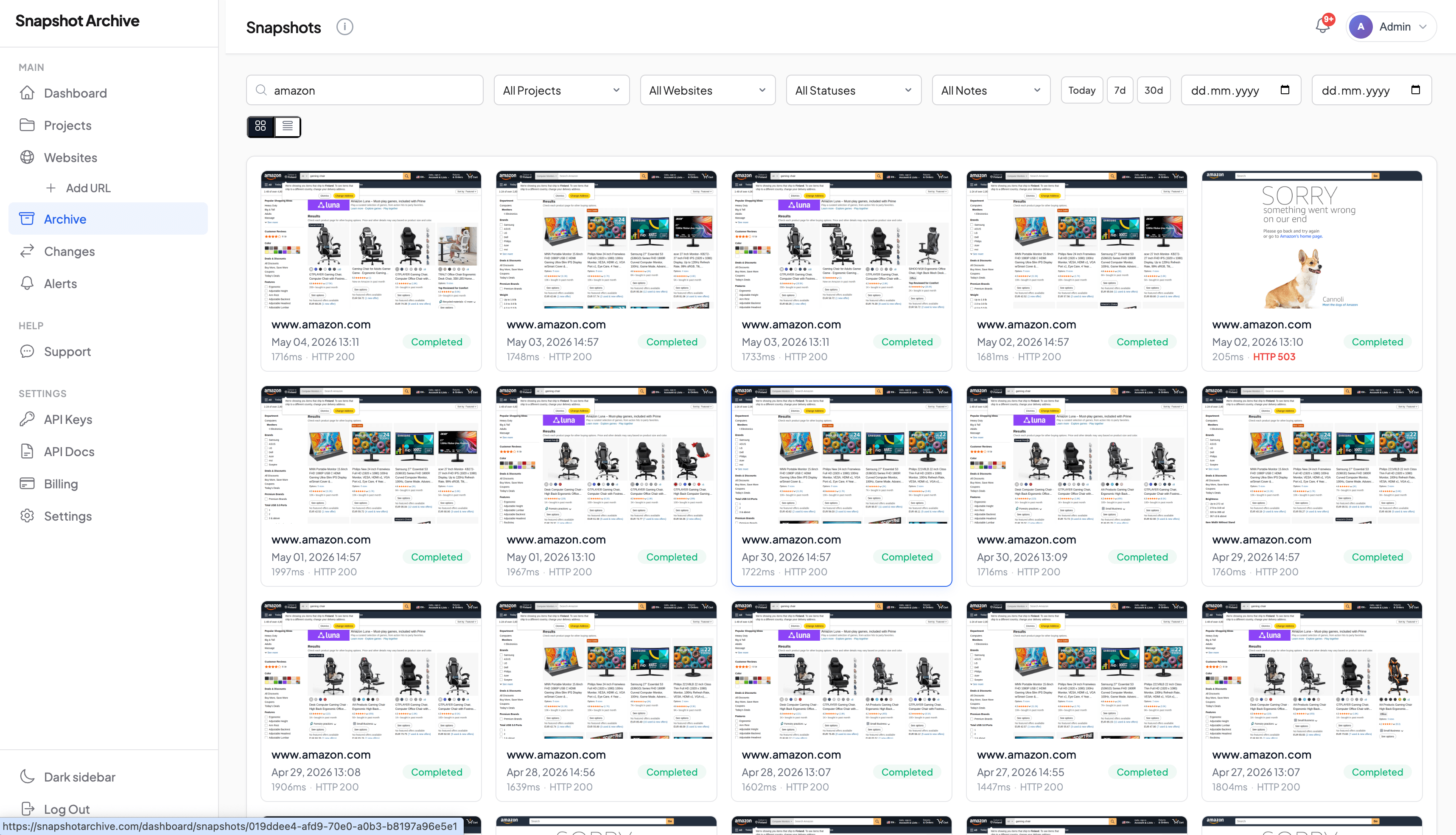
The gap between knowing a price changed and seeing how it was presented is where most e-commerce teams lose ground. Price scraping tools handle numbers well. But a number in a spreadsheet can't show you the urgency messaging, the layout of a promotional page, or whether a competitor added a "Compare at" strikethrough to make their deal look better. Ecommerce screenshot monitoring captures the actual page (exactly as a shopper would see it) and stores it where you can reference it weeks or months later.
Why e-commerce teams need website archiving, not just price feeds
E-commerce competitive intelligence has become heavily data-driven, and for good reason. Tools like Prisync, Competera, and Intelligence Node process thousands of SKUs and surface pricing trends that would be impossible to track by hand. But pricing is only one variable on a competitive product page. The visual presentation (how a price is framed, what badges sit next to it, whether a product shows "Only 3 left" or "Best Seller") shapes the buying decision just as much as the number itself.
Screenshot archiving fills a different role. Instead of extracting structured values, it preserves the entire visual state of a page at a specific point in time. You can go back and see exactly what a competitor's product detail page looked like on the first day of a Prime Day sale, or compare how your own category page rendered before and after a Shopify theme update broke the layout on mobile.
We ran a detailed experiment tracking Amazon product pages during a high-traffic sales period, capturing over 116,000 data points to see what screenshot-based monitoring actually reveals versus what it misses. The full write-up of that experiment covers methodology and results. The short version: screenshots catch visual context that structured scrapers ignore, but they're slower and noisier. Both have a place in an e-commerce toolkit.
What e-commerce companies actually archive. And why it goes well beyond product pages
When most people hear "ecommerce screenshot monitoring," they think of product detail pages. And yes, those are the starting point: the hero image, price, reviews count, Buy Box status, variant selectors, shipping estimates. A full-page screenshot captures all of that in one vertical image, which is useful for spotting changes you wouldn't notice if you were only watching one data field at a time.
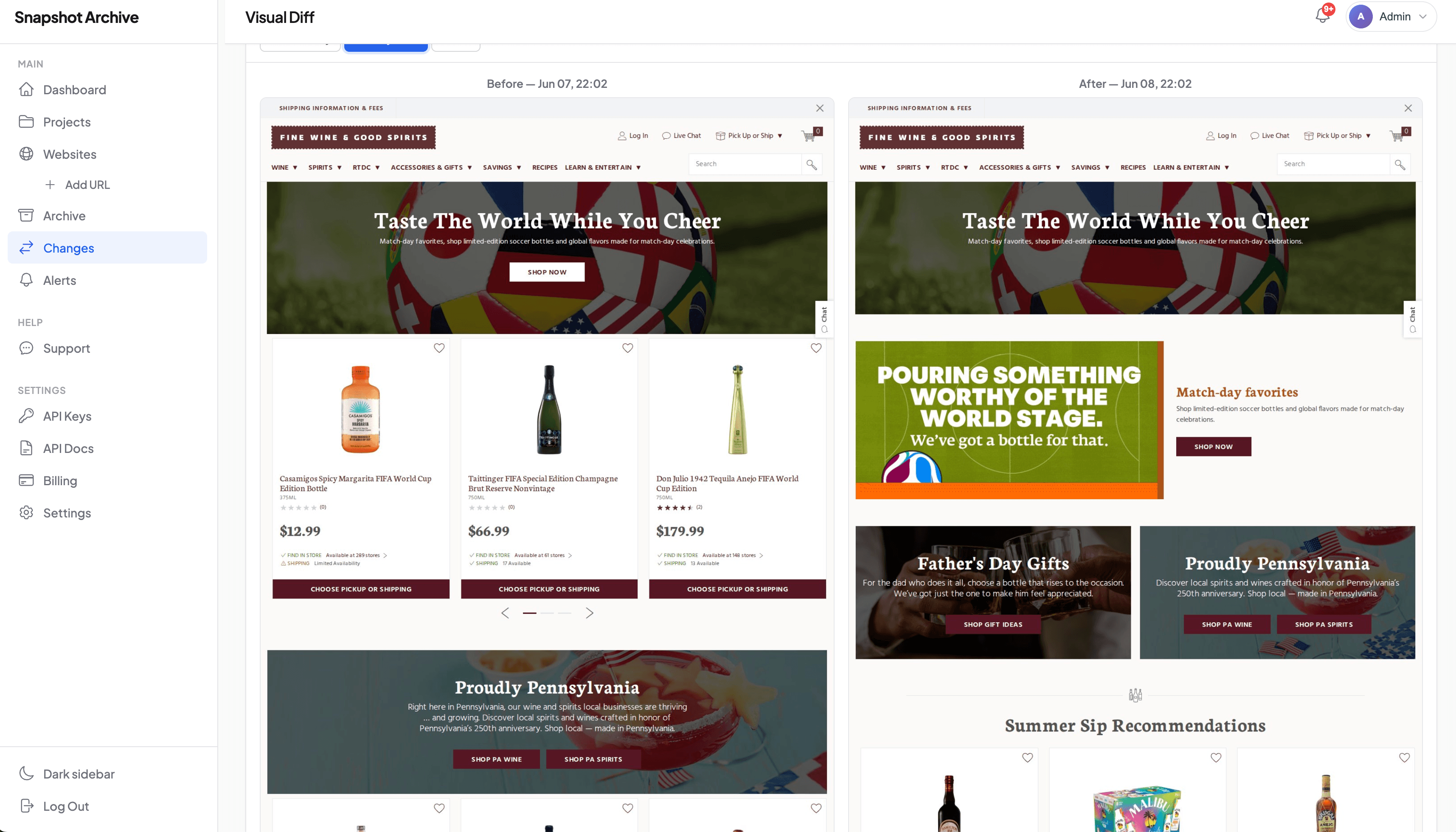
But product pages are just one layer. Category pages reveal merchandising strategy: which products a competitor promotes at the top of a collection, how they sort and filter, whether they're running a "New Arrivals" callout or a sitewide discount banner. Promotional landing pages (the kind built for Black Friday or a product launch) are often live for only 48 to 72 hours before they're taken down entirely. Without an archive, that competitive intelligence is gone.
Checkout flows get overlooked too. If you're benchmarking your conversion funnel against competitors, archived screenshots of their cart page, shipping options, and payment step give you a reference library that no analytics tool can replicate. And for brands selling on Amazon or Walmart Marketplace, monitoring your own product listings for unauthorized changes (altered images, incorrect descriptions, suppressed Buy Boxes) is a defensive necessity, not just a competitive exercise.
What competitor product page tracking reveals that pricing feeds miss
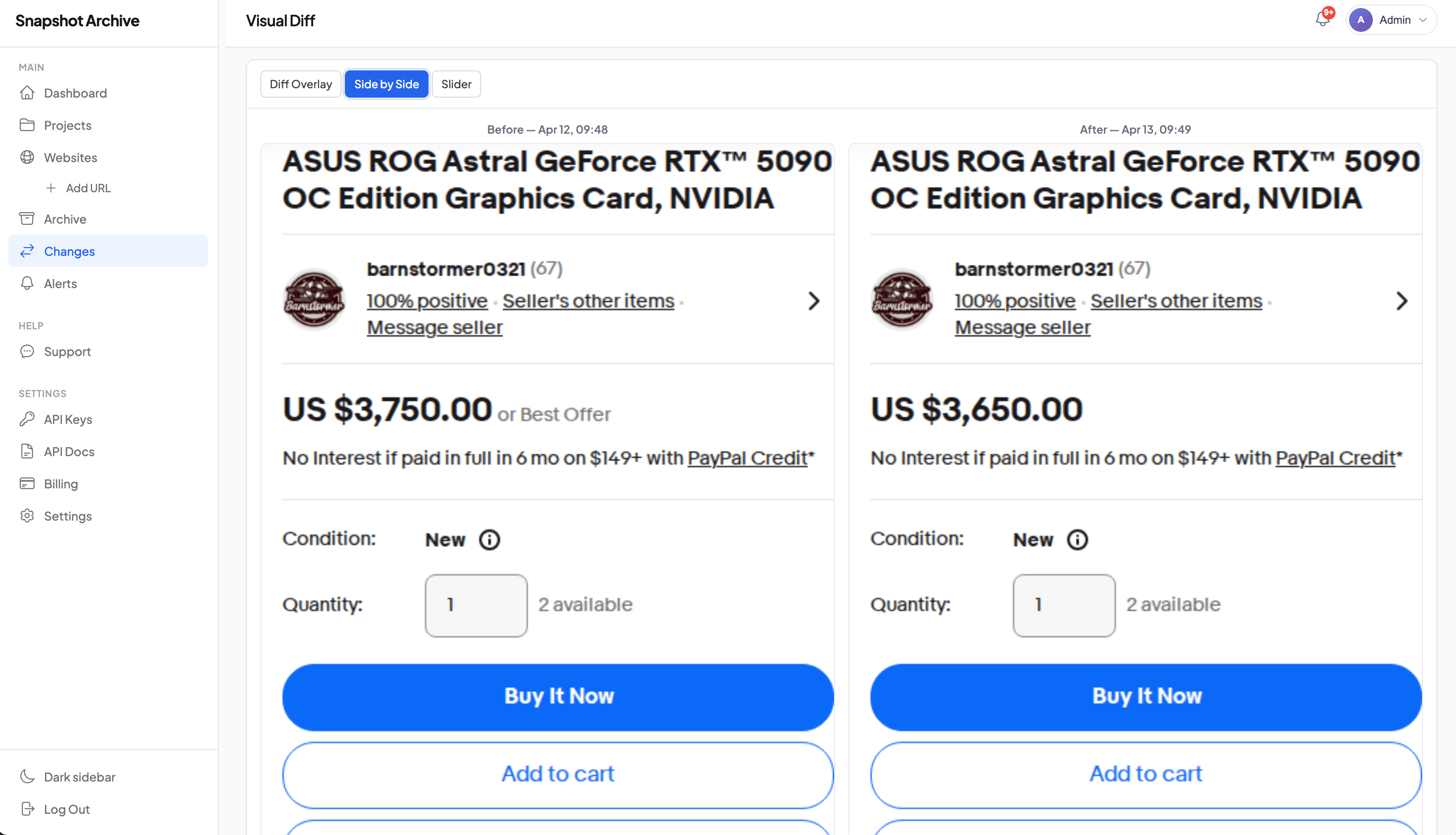
A pricing feed tells you that a competitor's product went from $89 to $71. What it doesn't tell you is whether that price was displayed with a red "SALE" badge, a strikethrough original price, a "Limited Time" label, or a bundle offer that adds a free accessory. These visual signals affect how aggressively a price cut lands with shoppers, and they change the way you should respond.
There's also the dynamic content problem. Many e-commerce sites personalize offers based on geography, show different pricing to logged-in versus anonymous visitors, or A/B test promotional elements. A scraper extracts one version of the truth. A screenshot captures what a visitor from a specific location and context actually sees. Neither approach is complete on its own, which is why the most useful setups combine both: we've written separately about where screenshot-based visual tracking fits alongside data scrapers, and the honest answer is that it's a complement, not a replacement.
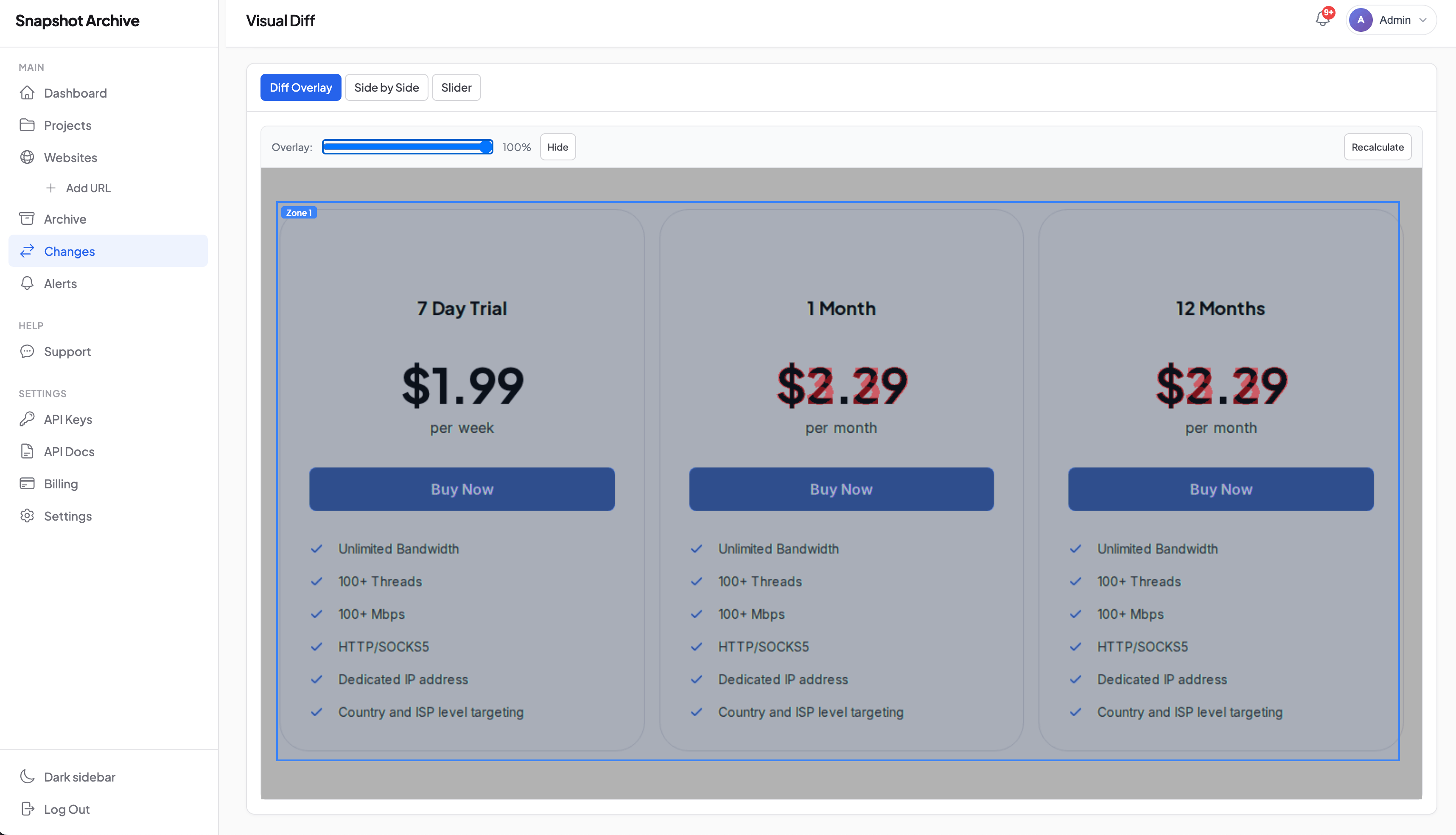
One feature that helps reduce noise is the ability to clip to a specific page element, isolating just the price block, or just the promotional banner, so that change detection (pixel-level comparison that flags differences between captures) focuses on the area you care about instead of triggering on every ad rotation and cookie banner. This cuts false positives considerably, though it does require some initial setup to define the right zones.
MAP violation enforcement needs timestamped visual proof, not just data
For brands that enforce Minimum Advertised Price policies, the challenge usually isn't knowing that a violation happened. It's proving it six months later. A retailer advertises your product below the agreed floor, you send them a warning, and they either deny it or quietly fix the price before you can document it. Sound familiar? Without a timestamped record of exactly what their page showed and when, enforcement conversations turn into "he said, she said."
This is where screenshot archiving has a clear, practical edge. A scheduled screenshot captured every few hours creates a visual record showing exactly what price was advertised, on what date, and at what URL. When that screenshot includes a watermark with the UTC timestamp and URL burned directly into the image, it becomes significantly harder for a retailer to dispute the evidence.
Brands that need to go further (sending formal cease-and-desist letters or involving legal counsel) can use the PDF export with a SHA-256 hash certificate to provide a verifiable chain of evidence. The hash proves the file hasn't been altered after capture. Is this the same as a notarized legal document? No, and we wouldn't claim it is. But screenshots as legal evidence have been accepted in many commercial disputes, and a timestamped, hashed capture is materially stronger than a screenshot someone grabbed on their laptop. Legal firms working with e-commerce brands have found this workflow particularly efficient for building enforcement case files.
Your competitor's Black Friday campaign disappears in 48 hours. Unless you archive it
How did your competitor run their Black Friday campaign last year? What products did they feature? What discount structure: percentage off, dollar amount, tiered bundles? If you don't have an archive, the answer is usually "we don't remember, and the Wayback Machine didn't catch it."
Seasonal campaign archiving is one of the more underappreciated uses of automated screenshots. By setting up captures on competitor homepages and key category pages during peak shopping periods, you build a reference library that compounds in value each year. Your merchandising team can compare this year's Prime Day strategy against last year's, side by side. Your design team can study how competitors evolved their promotional page layouts. Your pricing team can see whether a competitor's "biggest sale ever" was actually bigger than the year before, or just louder.
This kind of historical record doesn't exist anywhere else. Social media posts get deleted. Email campaigns sit in individual inboxes. Promotional landing pages are taken down within days. A screenshot archive is the only reliable way to preserve the full visual record of a competitor's seasonal strategy, and your own. We've seen e-commerce teams use their own campaign archives for post-mortem reviews, comparing what the live homepage actually looked like against the mockup that was approved in Figma. That stings sometimes, but it's useful.
E-commerce visual regression testing after store updates and theme changes
You push a Shopify theme update at 2 AM. Monday morning, someone on the team notices the Add to Cart button is gone on mobile. It's been missing all weekend. How many sales did that cost?
Visual diff comparison catches these regressions by overlaying before-and-after screenshots and highlighting the pixels that changed. A misaligned Add to Cart button, a missing product image, a reviews widget that stopped rendering. Automated tests often miss these because the underlying HTML might technically be "correct" even though the visual output is wrong.
Setting up a daily capture of your top 10-20 product pages with change alerts enabled means you get notified when something visually shifts on those pages. Most days, the changes are expected: a price update, a new review count, a seasonal banner swap. But the alert that catches a checkout button disappearing after a deploy is worth the entire setup cost. Our guide on managing false positives in screenshot monitoring covers how to tune sensitivity settings so the noise stays manageable.
An ecommerce screenshot monitoring setup for five competitors
One DTC brand we spoke with set up daily captures of three competitor storefronts. Within two weeks, they'd expanded to five. The competitor monitoring side typically involves 8 to 12 URLs per competitor: the homepage, two to three key category pages, and three to five top-selling product pages. Captures run once or twice daily during normal periods, and every four to six hours during known sales events. Change detection flags significant shifts, with alerts going to a shared Slack channel or email list. The goal isn't to react to every change in real time, it's to build a record and flag what matters. If you're not sure which pages to start with, the guide on what competitor pages to monitor breaks down the selection logic.
The internal monitoring side covers 10 to 20 of the brand's own product pages, the cart page, and one or two checkout steps. These are captured daily with visual diff enabled, primarily to catch regressions. Some teams also add their own homepage to the monitoring list, partly for quality assurance and partly to maintain an archive of their own promotional campaigns for internal reference.
The total URL count in this setup is usually 60 to 100 monitored pages. Teams that also sell on Amazon or other marketplaces add those listing URLs too, which can push the count higher but provides coverage of a channel you don't fully control. Check pricing to see where your needs would land.
Where screenshot archiving fits alongside Prisync, Competera, and your existing stack
Snapshot Archive is not a replacement for Prisync, Competera, or any dedicated price intelligence platform. Those tools process thousands of SKUs, run repricing algorithms, and integrate with your commerce platform's pricing engine. Screenshot archiving doesn't do any of that.
What it does is fill the gaps that data-only tools leave. The visual context around a price change. The proof that a MAP violation happened. The historical record of a seasonal campaign. The regression check after a store update. These use cases sit alongside your pricing tools and competitor monitoring workflows, not in competition with them.
SaaS companies use screenshot archiving for similar competitive intelligence reasons. Tracking pricing page changes, feature comparison updates, positioning shifts. The e-commerce version is more operationally focused: less about messaging, more about pricing, merchandising, and compliance. But the underlying workflow of scheduled captures, change detection, and visual comparison is the same.
There are real limitations worth knowing about. Screenshots capture a single viewport at a specific moment: they won't show you dynamically loaded content that requires interaction , though full-page captures handle scroll depth well. They can be affected by layout shifts that make change detection noisy. And they don't extract structured data you can pipe into a repricing algorithm. Know what you're getting, and you'll get real value from it.
How to start with your top competitor's product page in five minutes
Pick your closest competitor's best-selling product page, the one you already check manually every few days anyway. Set up a scheduled capture running twice daily with change detection enabled. Give it a week.
After seven days, you'll have 14 timestamped captures of that page. You'll see whether the price changed, whether promotional badges appeared or disappeared, and whether the page layout shifted. That small archive, covering just one product on one competitor's site, will tell you more about the practical value of ecommerce screenshot monitoring than any feature comparison page could.
If that first week turns up useful insights (and for most e-commerce teams tracking active competitors, it does) expand to a handful of additional product pages and a category page or two. Then add your own pages for regression monitoring. The archive compounds over time: captures from this month become the baseline for comparison next month, and the seasonal archive you build this year becomes next year's strategic reference.
Start archiving websites today
Free plan includes 3 websites with daily captures. No credit card required.
Create free accountFrequently Asked Questions
Website archiving for e-commerce is the automated capture and storage of product pages, competitor storefronts, and promotional content as timestamped screenshots. Unlike price scraping tools that extract numbers, screenshot archiving preserves the full visual state of a page — pricing, badges, banners, layout, and messaging — for historical reference and competitive analysis.
E-commerce teams set up scheduled screenshot captures on competitor product detail pages, category pages, and homepages. Snapshot Archive captures full-page renders at intervals you choose (daily, twice daily, or every few hours during sales events) and flags visual changes with change detection alerts.
Yes. Timestamped screenshots serve as visual proof of advertised prices, showing exactly what a retailer's page displayed and when. Watermarked captures and PDF exports with SHA-256 hash certificates provide evidence that holds up in enforcement conversations and legal disputes.
Price scraping extracts structured data like dollar amounts from product pages. Screenshot monitoring captures the full visual context: promotional banners, urgency messaging, strikethrough pricing, bundle offers, badges, and layout changes. Both are complementary — scrapers provide data feeds, screenshots provide the visual proof and context.
Set up increased capture frequency on competitor homepages and category pages during peak shopping periods like Black Friday or Prime Day. Tag and organize captures by campaign period. The following year, compare archived screenshots side by side to analyze how competitors evolved their promotional strategies.
Yes. Screenshot-based archiving is platform-agnostic — it captures what the browser renders, regardless of whether the store runs on Shopify, WooCommerce, Magento, BigCommerce, or a custom build. No integration or plugin installation is required.