
 Vitalii Holben
E-commerce price monitoring with screenshots: what we actually found
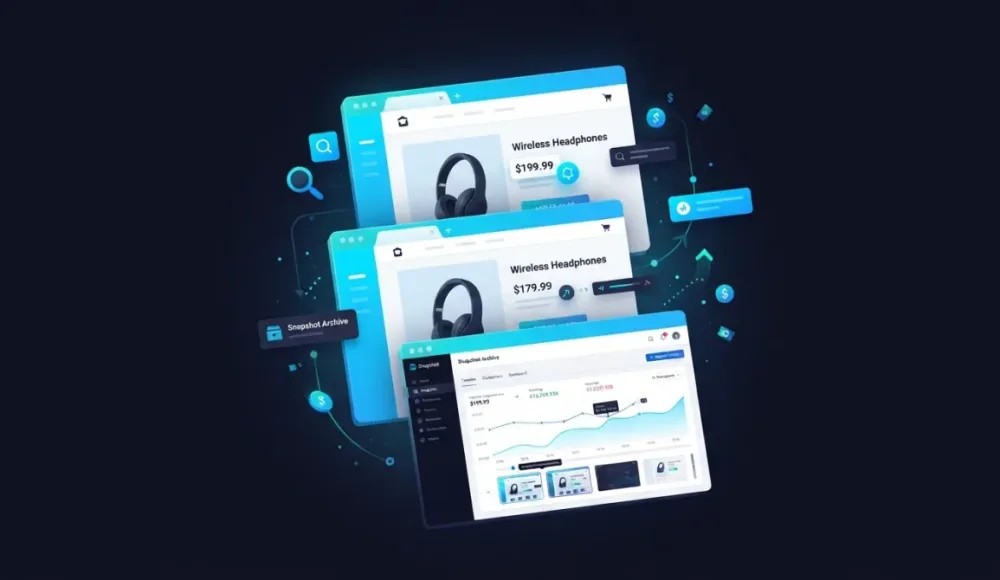
We decided to run an experiment: set up price tracking on Amazon using automated screenshots and see what actually comes out of it. We picked several different product categories (coffee machines, computer monitors, pressure cookers, kids' smartwatches) to collect enough data to compare how often prices change across different types of products.
The results weren't quite what we expected. Some of the most interesting findings had nothing to do with prices at all.
What we wanted to test
Most price monitoring tools work through scraping: they pull numbers from HTML, drop them into a table, and build charts. That works fine when the page structure is stable and prices sit in predictable tags. But real marketplaces don't work that way. Amazon renders pages dynamically, serves different prices depending on the visitor's region, shows modal windows about shipping restrictions, and shifts layouts between visits. A scraper sees HTML, but it doesn't see what the buyer sees.
We wanted to try a different approach: capture full-page screenshots of product pages on a schedule and compare them using visual diff. The idea was to record what the user actually sees (prices, badges, crossed-out amounts, "Limited time deal" labels) not just what an API returns.
What we set up and how
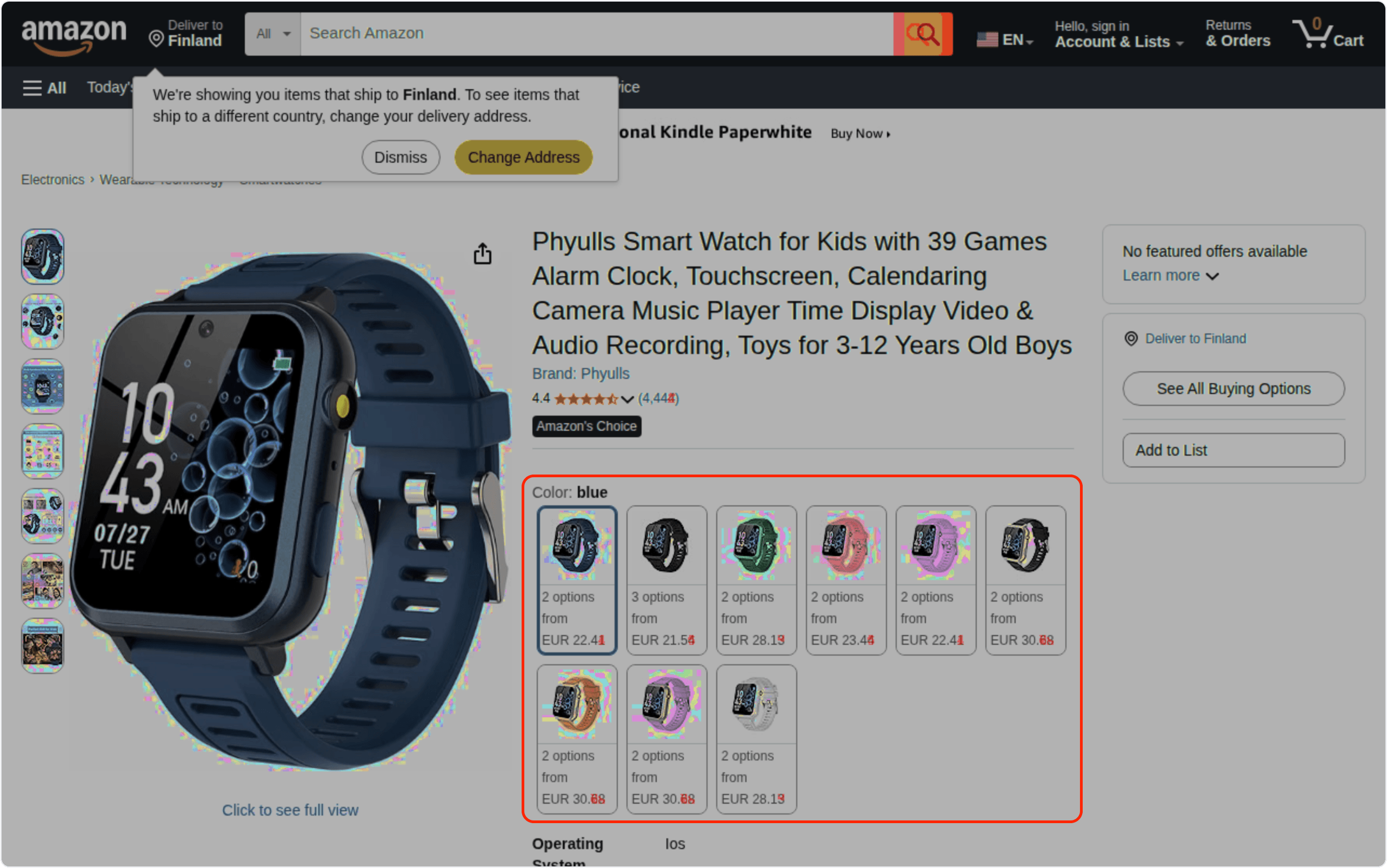
We added pages from several Amazon categories to monitoring: "Coffee machines" and "Computer monitors" as search results pages showing 4 products per row, "Pressure cookers" as another category listing, a specific product card for a Phyulls kids' smartwatch with 9 color variants, and the Amazon Deals page for general deal tracking.
Capture frequency was set to every 2 hours. The visual diff threshold was 2%, enough to ignore minor changes in ad banners while still catching price movements.
The first thing we noticed wasn't prices, it was errors
Roughly a third of all screenshots over two weeks turned out to be Amazon's "SORRY, something went wrong on our end" error pages. We covered this finding in detail in our article about screenshot-based availability monitoring. The short version: price monitoring through screenshots also reveals how often Amazon serves errors on specific pages, which matters for price analysis too. If your scraper tries to pull a price at that moment, it gets garbage, and you don't even know it happened.
Price changes we caught across five product categories
Between the error pages, visual diff highlighted real price changes. Every single category we monitored showed at least one price change within two weeks:
Category | Page type | Products with price changes | Price range (EUR) | Diff (%) |
|---|---|---|---|---|
Coffee machines | Search results | 4 out of 4 | 30.29 – 51.89 | 21–25% |
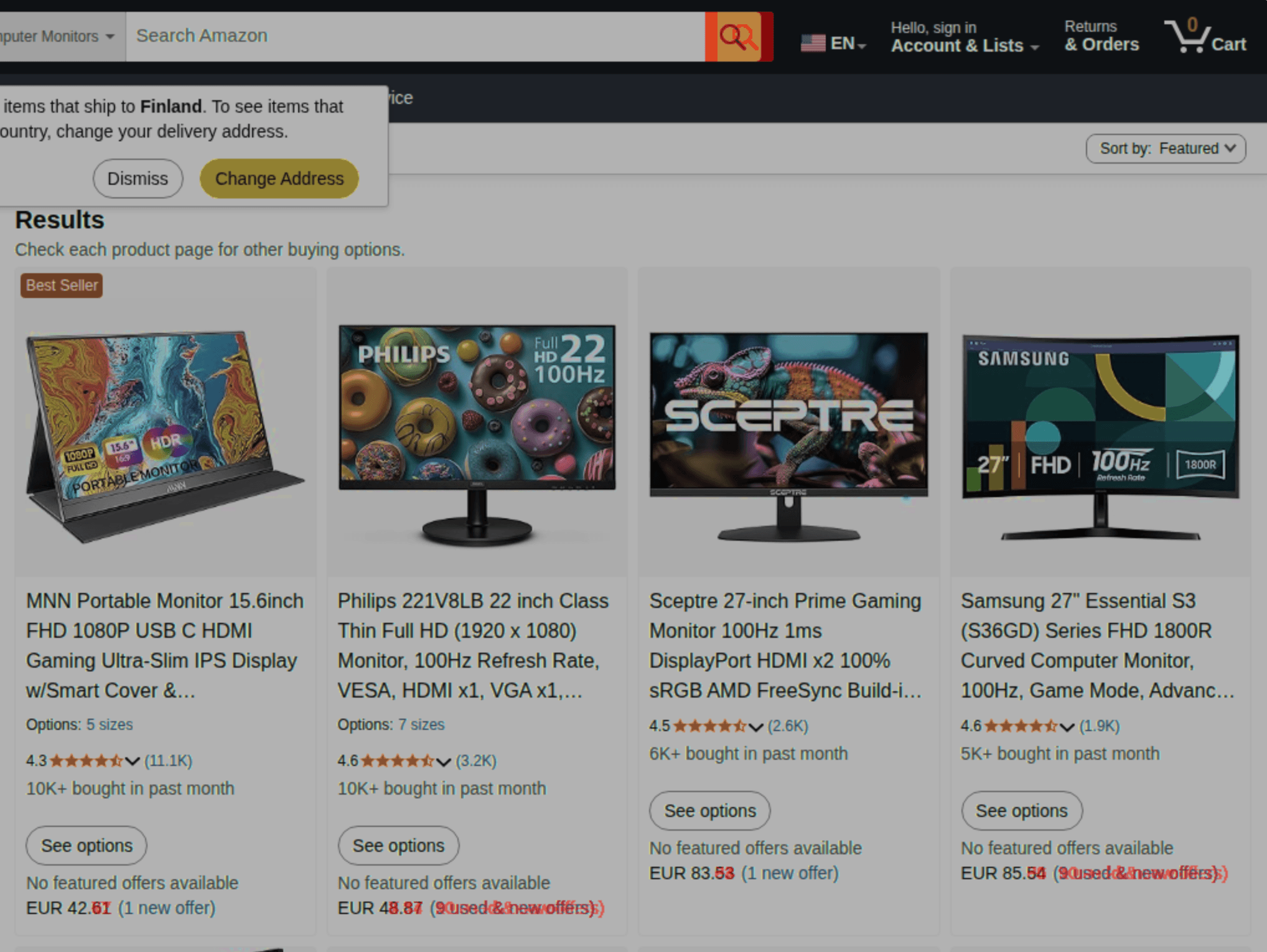
Computer monitors | Search results | 4 out of 4 | 42.61 – 85.54 | 22–29% |
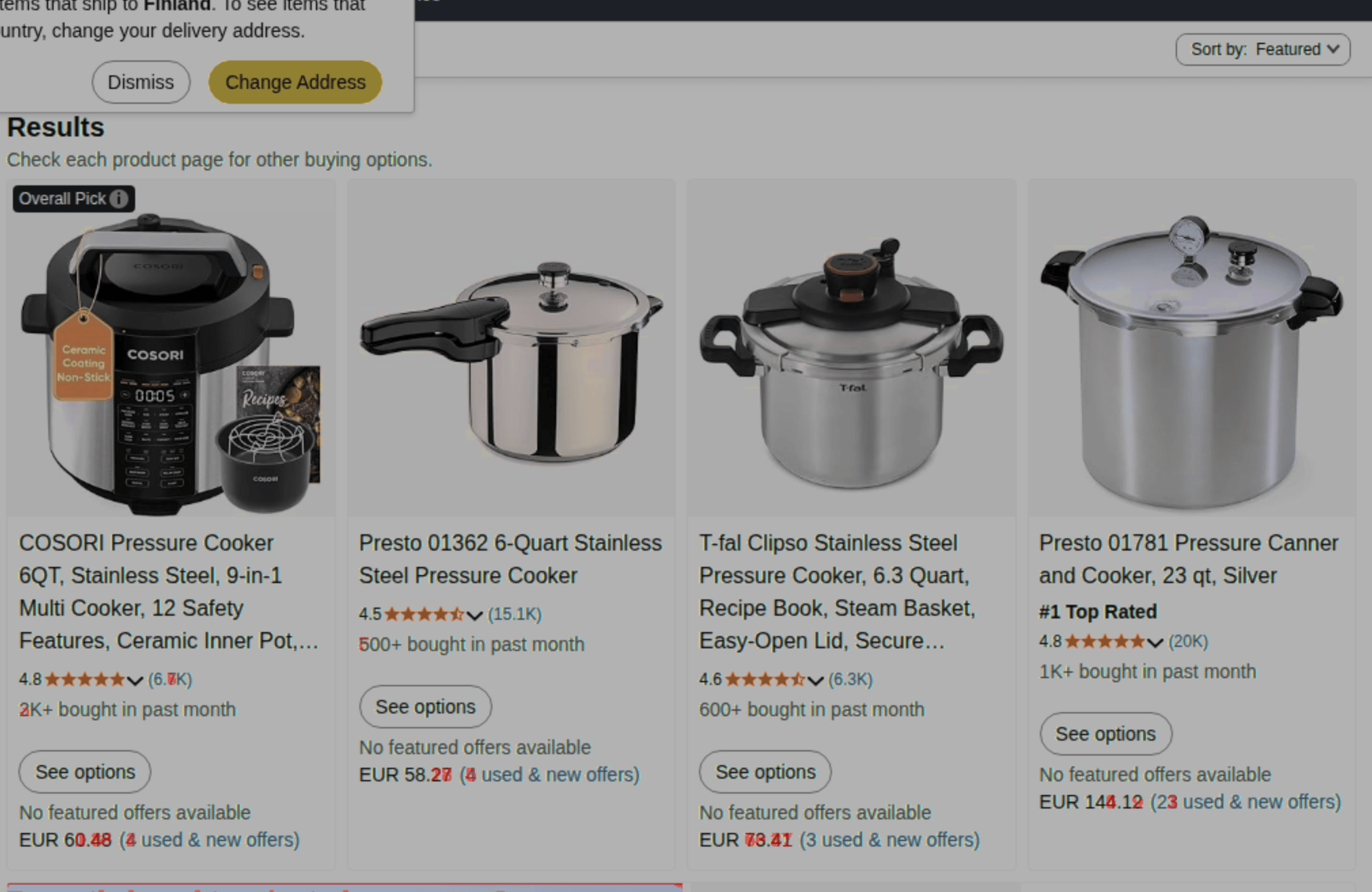
Pressure cookers | Search results | 4 out of 4 | 58.27 – 144.12 | 25–29% |
Kids' smartwatches | Product card | 9 color variants | 21.54 – 30.68 | 63.95% |
Amazon Deals | Deals page | 1 (TurboTax) | $55.99 – $79.99 | ~25% |
On category pages, diff picked up more than just price numbers: it also flagged changes in seller offer counts, monthly purchase counters, and "Best Seller" badges. On the product card (smartwatches), the diff percentage was the highest at 63.95%, because prices on 9 variants changed independently and diff highlighted the entire color selection block as one large change zone.
Below are screenshots with diff overlay showing how visual diff highlights price zones in red, plus videos where you can drag a slider to compare before and after states.
What we learned from two weeks of monitoring
Screenshots capture context, not just numbers. A crossed-out price, a "30% off" badge, a "Limited time deal" label, scrapers miss these because the elements don't sit in predictable HTML tags. A screenshot captures what the buyer sees, and for price analysis, the context around a number is often more telling than the number itself. A product showing "$49.99" tells you one thing. The same product showing "$49.99 $79.99 (38% off) Limited time deal" tells you something very different.
Availability data turned out to be a valuable side effect. We wrote about this in more detail in our availability monitoring article. If you make pricing decisions based on scraper data, it's worth knowing how much of that data is empty because the page was serving errors when the scraper ran.
For accurate price monitoring on marketplaces, capturing a specific element works much better than capturing the whole page. When we captured full category pages, diff reacted to banners, sidebars, and recommendation blocks, all noise that inflated the percentage and made it harder to spot real price changes. We covered this problem in detail in our article on layout shifts in Amazon price monitoring. If your goal is to track prices specifically, clip to element lets you capture just the product block, excluding side panels and promo banners from the comparison entirely.
A 2% diff threshold works well for product pages. Banner rotation and ad changes typically produce diff below 2%, while real price changes land at 20% and above. The gap between noise and signal is wide enough that a 2% threshold filters effectively without any manual tuning per page.
When screenshots work better than scraping and when they don't
Screenshot-based price monitoring isn't a replacement for specialized tools like Prisync or Price2Spy. If you have a catalog of 10,000 SKUs and need automated repricing, screenshots won't cut it. You need structured data flowing into a pricing engine.
But there are situations where the screenshot approach gives you something scraping can't. If you're tracking 5 to 20 key competitors or products, screenshots provide the full visual picture: prices, promo badges, availability status, placement on the page, deal labels, and the general presentation context. You see exactly what the buyer sees, not what the HTML source contains.
Then there's the case where scraping itself is unreliable. Amazon actively fights bots: pages serve CAPTCHAs, block IPs, change their HTML structure. A screenshot through a headless browser is a render of the real page, with all the JavaScript and CSS. It doesn't depend on CSS selectors or XPath expressions that break with every redesign.
Screenshots are also evidence. If you need to document that a competitor was selling a product for EUR 42.61 on April 12 and EUR 49.99 on April 15, you have timestamped visual proof, useful for MAP enforcement (minimum advertised price), supplier negotiations, and internal reporting. We covered the legal requirements for this in our guide to screenshots as legal evidence.
What we plan to test next
In this experiment we captured full pages and got the big picture, but with noise from banners and sidebars. The next step is to try monitoring only specific price blocks using clip to element, without the extra elements. The goal is to get a clean diff where red highlights only real price changes. No promo banners, no filters, no recommendation blocks in the comparison zone.
With that data, we want to build a more analytical picture: how much prices actually moved in each category over a specific period, how frequently changes happen, and whether there are patterns by time of day or day of week.
How to try this yourself
Setup takes a couple of minutes. Add the URL of a product page or category, pick a capture frequency (every 2 to 4 hours works well for e-commerce), and set the diff threshold to 2%. If the page has a cookie banner, use hide selectors to remove it before the snapshot: otherwise it'll trigger false diffs on every capture.
For the first few days, just watch the dashboard. You'll quickly see which pages are stable, which change often, and which regularly serve errors. That's already valuable information, even before the first price change shows up.
Snapshot Archive's free plan lets you track up to 3 URLs. Enough to test on one or two competitor products and see whether screenshot-based price monitoring gives you insights that your current approach misses.
Start archiving websites today
Free plan includes 3 websites with daily captures. No credit card required.
Create free account
Text Monitoring vs Visual Diff: What Each One Actually Catches
Text monitoring and visual diff solve different problems. One reads the code, the other compares what visitors actually see. Here's how to pick the right one.

Ad Landing Page Screenshots for FTC Compliance
The FTC investigates ad claims retroactively. By the time they look, your landing page has changed. Automated screenshots with timestamps create a record of what you published and when.
Website Screenshot Retention: How Long to Keep Screenshots and Why It Matters
How long should you keep website screenshots? It depends on your industry, your use case, and the regulations that apply to you. This guide covers retention periods for financial services, healthcare, e-commerce, SaaS, and more — with storage cost estimates and a checklist for building a retention policy.