
Timestamped screenshots with watermark — every capture, on every plan
A screenshot without a date is just a picture. You can claim it was taken today, last week, in March 2024, and there's no way to verify any of it.
That's why every snapshot we save can carry a timestamp and source URL, baked into the image automatically. One toggle when you set up a monitor. Available on every plan, including Free.
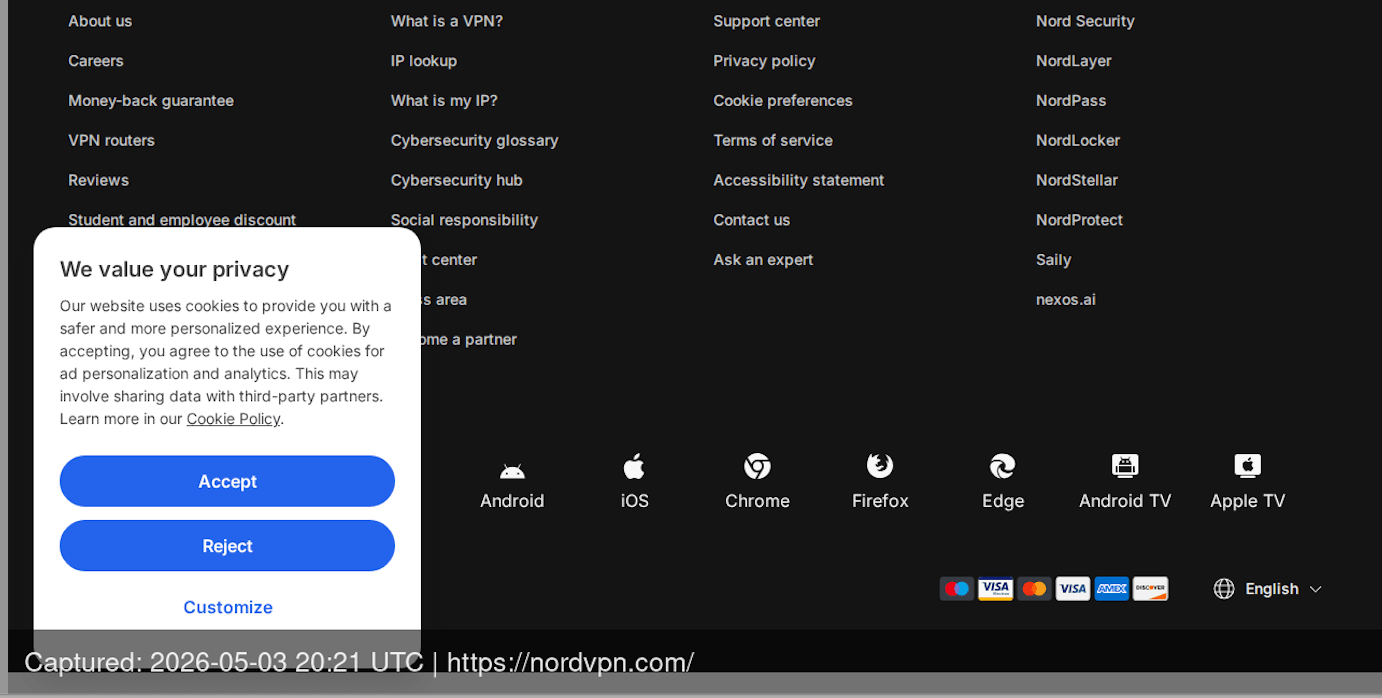
What every watermarked screenshot actually shows
The bar sits at the bottom of the image. It's semi-transparent, so it doesn't cover the site's content, but it doesn't get lost on a white background either. The text on it is plain:
Captured: 2026-05-04 14:30 UTC | https://example.comDate and time in Y-m-d H:i format, always UTC. The URL is the one you added to the monitor, no shortening.

Font size scales with the image width. On a mobile capture at 375 pixels the text stays readable. On a 1920-pixel desktop capture it doesn't shrink into a tiny strip. Technically it's imageWidth * 0.02 with a 16-pixel minimum.
Nothing is configurable. No font choice, no color, no position, no custom fields. One toggle on the monitor page (Enable watermark) and every snapshot taken from that point on carries the same mark.
Why we standardized on UTC instead of local time
This is a deliberate choice, not an oversight. Your profile has a timezone setting, and we use it across the dashboard so times read the way you expect. But on the image itself, we always print UTC.
There are three reasons, and each one becomes obvious the moment a snapshot leaves your account.
Local time is ambiguous. "Captured: 2024-03-10 02:30". Which 02:30 exactly? In the US, clocks shift that night, and depending on the state the label can refer to two different moments. UTC doesn't have that problem.
The recipient lives in a different timezone. If you're in Kyiv, sending an archive to a lawyer in London who forwards it to a partner in San Francisco, each of them reads "14:30" their own way. UTC is the same for everyone.
UTC is the standard for technical and legal documents. Server logs, audit trails, international contracts, eIDAS-style certification all run on UTC. A screenshot whose timestamp is written in the same system slots into an existing evidence chain without translation.
And if a particular dispute does need local time, that's a one-step conversion from UTC. The reverse, taking an image stamped "14:30 GMT+2" with no DST flag and figuring out what it really means, is expert work.
The original screenshot is never modified
This is a technical detail, but for compliance scenarios it matters more than it sounds.
When we take a snapshot, the original goes into Object Storage clean. No bar, no watermark, no post-processing. The watermark is applied on the fly the moment you open the snapshot in the dashboard, download it, or fetch it through the API.
What that gets you in practice:
Archive integrity doesn't depend on whether watermark was on at the time of capture. If you turn it off in six months, or turn it on for an existing monitor, old snapshots keep their original timestamp and the watermark renders against the moment they were actually taken.
Visual diff works on clean pixels. When we compare two snapshots and count the differences, the algorithm sees the originals: no overlay. Otherwise an unchanged page would trip false alarms just because the timestamp inside the bar moved.
Authenticity is easier to verify. If anyone questions the watermark, you can pull the original from storage and show that the mark is generated deterministically from the snapshot's metadata (capture date and URL, which we store separately from the file).
When timestamped screenshots actually carry weight
Not every snapshot needs a stamp. If you're grabbing a screenshot for a deck or a Slack message to a colleague, it's noise. But there are cases where the absence of one turns evidence into "well, maybe."
Trademark disputes. A competitor uses your brand in copy, in meta descriptions, in image alt text. Two weeks after a complaint they take it all down and claim they "never did that." A snapshot with a UTC stamp and the URL is a dated record that fits straight into a DMCA filing or an Amazon Brand Registry complaint.
Price monitoring and antitrust work. Regular captures of competitor pages, each stamped with a date and URL, build a time series. When the question becomes "when did they raise the price on X?", the answer is in the archive, not in someone's memory. A typical setup: a monitor tagged competitor, pricing-page, homepage, daily frequency, watermark on.
Archives for media and editorial teams. A journalist cites a page. A week later the site changes the wording or pulls the article. A timestamped snapshot confirms what the source looked like when the story went out. It's standard practice for fact-check desks.
Agency client reporting. When you show a client every month how their landing page looked, which banners ran, which copy was live, the timestamp on each capture removes the "is this really from that period?" question. Especially useful when you're cycling through A/B test variants.
The legal side of this is worth its own write-up, and we've covered what makes a screenshot usable as court evidence in more detail: storage integrity, chain of custody, where timestamp fits in. The point I want to make here is narrower: a watermark on its own doesn't make a snapshot unchallengeable. It makes the snapshot verifiable.
Where the watermark shows up (everywhere, the same way)
When you turn watermark on for a monitor, the mark appears in every place a snapshot can leave the system:
In the dashboard, when you open a snapshot in the monitor's gallery. On a public shared link, the kind you can send to a client or colleague without giving them an account. On manual downloads through the interface. On API requests, when you wire the archive into other systems. In ZIP exports and snapshot packages for compliance work. In PDF exports, where the watermark becomes part of the document page itself.
This is intentional. Any situation where the watermark is on in one channel and off in another breaks trust in the archive as a whole. If a recipient sees two versions of the same snapshot (one stamped, one not) the obvious question follows: "Which one is real?"
So there's one version, stamped on the fly the same way everywhere.
How to turn it on (and how to turn it off)
When you create or edit a monitor, the Viewport & Capture block has an Enable watermark toggle. It's off by default: we don't stamp images behind your back. Right under the checkbox there's a hint that reads "Adds a semi-transparent bar at the bottom of each screenshot with capture date and URL", that's the entire feature in one sentence.
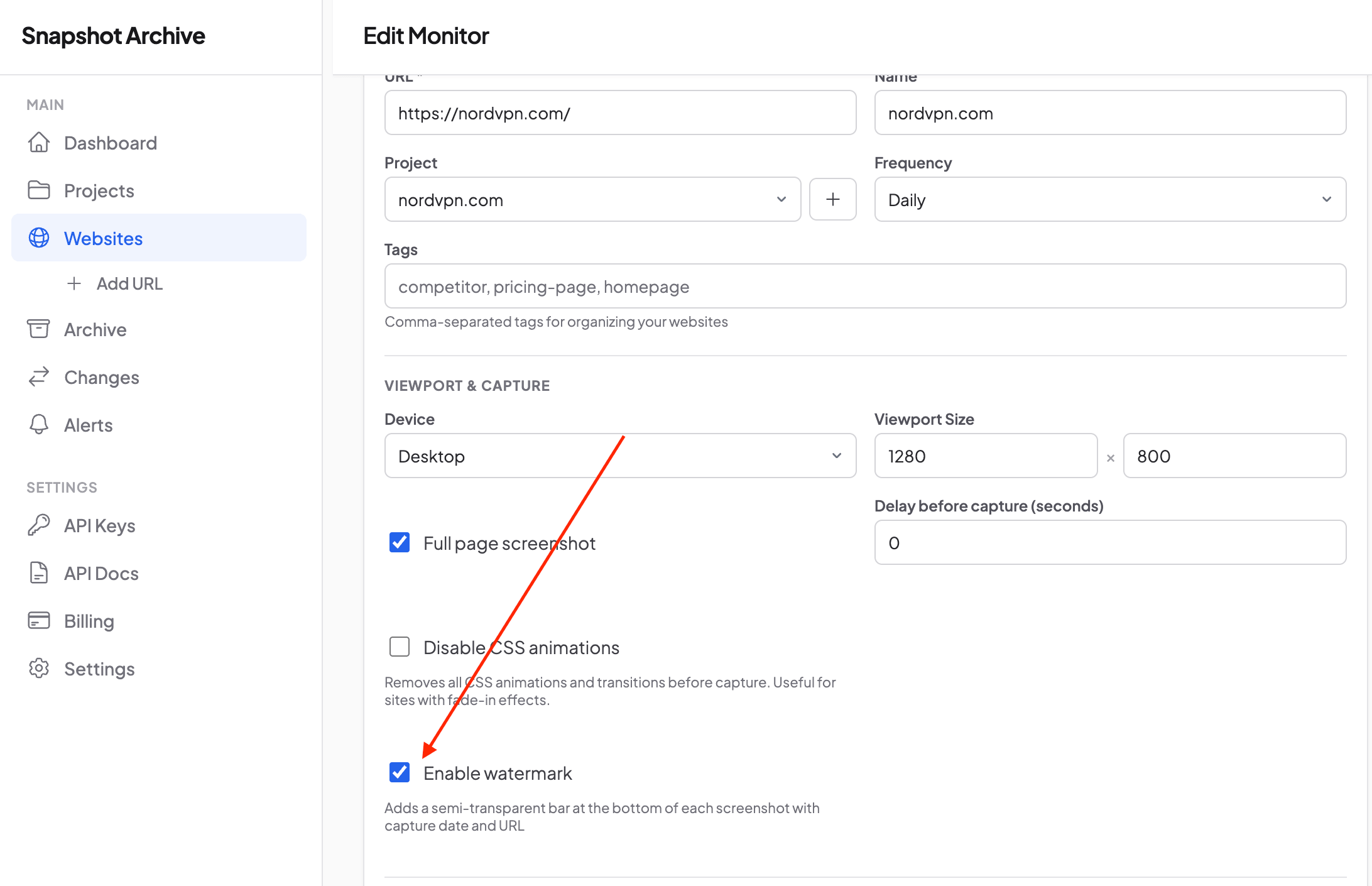
Switch it on and every new snapshot for that monitor carries the mark. Change your mind a week later and switch it off. Old snapshots in the archive keep the timestamp from the moment they were captured (because the watermark is rendered on the fly from their own metadata), and new ones come through clean.
The setting lives at the monitor level, not the account. That means you can monitor the same URL twice: once with watermark for a compliance archive, once without for an internal gallery of design changes. Setting up parallel configurations is covered in projects and organization.
A note on what watermark does and doesn't prove
Honest answer: a date and URL stamped on an image isn't a notarized affidavit, and it isn't a digital signature. In high-stakes legal disputes where the numbers run into millions, you'll still want a certified expert or a forensic-capture service like Page Vault, which exists for exactly that purpose.
For the bulk of business cases, though (DMCA complaints, brand monitoring, internal compliance audits, client reports, price tracking, editorial archives), the combination of automatic regular capture, a UTC timestamp, immutable storage, and the source URL produces documentation at the level that actually gets accepted in practice.
The watermark doesn't make a snapshot unchallengeable. It makes it verifiable: anyone looking at the image sees when and where. The rest comes from the storage guarantees underneath: the original kept in Object Storage, metadata with a content hash, long-term retention.
If you're building an archive for compliance, for editorial work, for competitor tracking, or for client reporting, turn watermark on. It costs nothing, it doesn't touch the originals, it doesn't interfere with visual diff, and it behaves the same way everywhere a snapshot can end up. One toggle, one consistent behavior, one less thing to argue about when proof is on the line.
Start archiving websites today
Free plan includes 3 websites with daily captures. No credit card required.
Create free account