
Competitor website monitoring with automated screenshots
Your competitor drops their price by 20% on a Friday afternoon. You find out the following Monday. From a customer who switched. By then the pricing page has changed again, and you have no proof of what it looked like 72 hours ago.
That gap between "something changed" and "I noticed" is where competitive intelligence falls apart. Manual checks don't scale past two or three sites. Browser bookmarks capture nothing. And by the time someone on your team spots a shift, the original version is gone. You need a way to track competitor website changes automatically.
I built Snapshot Archive to close that gap. It's competitor website screenshot monitoring on autopilot: set up scheduled screenshots for the pages that matter, and every change gets captured automatically. You get timestamps, a visual history you can scroll back through, and alerts when something looks different.
Why monitor competitor websites visually
Most competitive intelligence workflows focus on what competitors say, press releases, blog posts, social mentions. But the changes that affect your business most are the ones nobody announces: a redesigned pricing toggle that nudges visitors toward annual billing, a trust badge added above the fold during enterprise sales season, a hero section rewritten to target a different buyer persona. These decisions play out on the page, not in a press release. And they only survive as long as the next redesign, which is why capturing them as screenshots. on a schedule: is the only reliable way to build a competitive record.
Six months of scheduled captures become a timeline of your competitor's strategy. You can trace when they shifted positioning, how long each experiment lasted, and whether they doubled down or rolled back. That kind of pattern recognition is impossible from a single alert, it requires an archive.
That timeline is the part most monitoring tools skip. Visualping and ChangeTower focus on alerting you the moment something changes, which is useful in isolation. But alerts without history leave you reacting to individual events without seeing the pattern behind them. If you're coming from one of those tools and want both sides, I wrote a comparison on the Visualping alternative page that covers the differences honestly.
What competitor pages are worth tracking
Each type of competitor page answers a different strategic question. And the answer only becomes visible over time, across multiple screenshots.
Pricing pages answer "where is the competitor heading financially?" A daily screenshot archive of three competitors' pricing pages over a quarter typically surfaces two to four changes you would have missed: plan restructuring, dropped tiers, adjusted price points. That's enough to adjust your own positioning before customers start asking why your plan costs more. I wrote a separate deep-dive on price monitoring if that's your primary use case.
Landing page changes are calendar-driven. Product launches, funding rounds, seasonal pushes, and pricing experiments all show up on the homepage first. Archiving these pages daily creates a timeline you can overlay against public events, when did the competitor announce their round, and how did the homepage change in the weeks before? That correlation is only visible in retrospect, and only if you have the screenshots. I covered the Paddle redesign as one example. Four distinct homepage versions in three months, each tied to a different go-to-market push.
Feature pages reveal roadmap direction indirectly. A new "Enterprise" tab, a removed beta tag, or an added integration logo: these small shifts signal where engineering effort is going, often months before a public announcement.
Terms of service and claims pages carry legal weight. Competitors sometimes make aggressive claims about performance or compliance certifications, then quietly remove them. A timestamped screenshot archive becomes evidence if you ever need to challenge a false claim. If you're building your URL list from scratch, I wrote a practical guide on choosing which competitor pages to monitor that covers the selection criteria in detail.
How it works in three steps
Setting up competitor monitoring in Snapshot Archive takes about five minutes per competitor. Here's the workflow.
Add the URLs you want to track
Paste in each competitor page URL. For a typical SaaS competitor, that's usually four to six pages: homepage, pricing, one or two feature pages, and the terms page. Snapshot Archive captures full-page screenshots by default, so you get the entire page from header to footer, no manual scrolling or viewport configuration.
Set a capture schedule
Match the capture frequency to how fast the page typically changes, not to a fixed rule. Start with daily captures for a two-week baseline, then adjust: pages with zero changes can drop to weekly, pages that triggered alerts in that window should stay at daily or higher. The goal is to never miss a change, not to accumulate identical screenshots.
Turn on change alerts
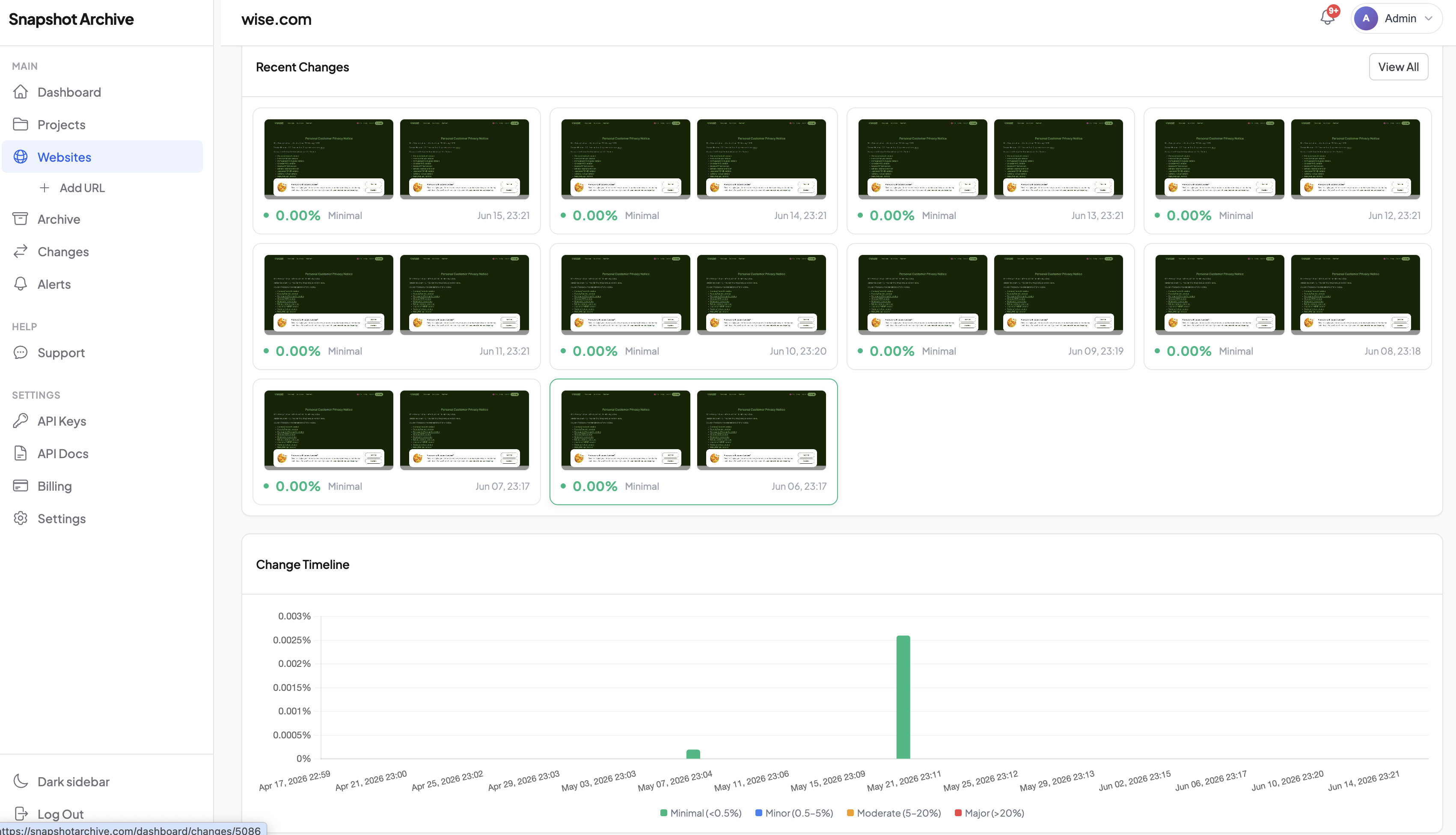
Once screenshots start accumulating, change alerts notify you when Snapshot Archive detects a visual difference between consecutive captures. You get an email with the before-and-after comparison. No need to log in and manually scan through screenshots. The visual diff highlights exactly what shifted, whether it's a single line of copy or a full redesign.
Screenshot archive vs. Change alerts: you need both
Every competitor monitoring tool I've tested forces a choice. Stillio gives you scheduled screenshots with no change detection, you're scrolling through captures manually, hoping to spot the difference. Visualping gives you change alerts with no visual archive. you know something changed, but the history is gone after a few days.
Snapshot Archive runs both in the same workflow. Every scheduled capture feeds into a persistent visual timeline, and every pair of consecutive screenshots runs through the diff engine. Alerts tell you when to pay attention. The archive tells you what the competitor has been doing for the past six months.
That combination matters when you're presenting competitive intelligence to your team (a workflow marketing agencies use daily). A single "their pricing changed" alert is a data point. A timeline showing four pricing changes over a quarter, with the exact screenshots and dates, is a pattern. PDF export turns that timeline into a report you can drop into a strategy meeting: something I haven't seen Visualping or Stillio offer.
Monitoring five to ten competitors at scale
One competitor is easy to watch manually. Five competitors across four pages each is twenty URLs with daily captures, generating 600 screenshots a month. Nobody reviews those by hand.
Snapshot Archive handles the volume in the background. Change alerts act as a filter, you only look at screenshots when something actually changed. For the pages where nothing happened, the archive quietly builds a visual record that confirms stability, which is its own kind of intelligence.
A practical setup for a mid-market SaaS company tracking five competitors looks like this: 20-25 URLs, daily captures for pricing and feature pages, weekly for everything else, alerts enabled on all of them. That generates around 15-20 alerts per month in my experience, with the rest confirming no change. I described the full setup process in a separate how-to if you want the step-by-step walkthrough.
Dealing with noise in the first week
Two sources of false positives will show up early: cookie consent banners and rotating dynamic content. Both are solvable. Element exclusion handles banners in thirty seconds per URL, and setting the diff sensitivity threshold to ignore sub-5% changes filters out testimonial carousels and counters without masking real updates. The full setup details are in the competitor monitoring how-to on the blog.
If competitor website screenshot monitoring is on your roadmap for this quarter, start with the free plan, add your top competitor's pricing page, set daily captures, and see what the diff catches in a week. That first alert showing a change you would have missed is usually enough to justify expanding to the full competitor set. It's how I validate the product myself. I track three competitors daily and still get surprised by what the diffs catch.
Frequently Asked Questions
There's no universal answer — it depends on the page's change velocity. Run daily captures for two weeks on any new URL to establish a baseline. If a page triggers zero alerts in that window, drop it to weekly. Pages that change during your baseline period should stay at daily or higher.
Snapshot Archive captures pages the same way any browser visits them — there's nothing to install on the competitor's site and no way for them to distinguish a scheduled capture from a regular visitor. Monitoring public web pages is standard competitive intelligence practice.
Text-based tools compare the HTML source code and flag changes in copy. Visual monitoring captures the rendered page as a screenshot and compares the pixels. Design changes, layout shifts, new images, and removed sections only show up in visual monitoring — they leave no trace in the text layer.
Yes. Capturing screenshots of publicly accessible web pages is standard practice in competitive intelligence. You're viewing the same content any visitor sees — there's no scraping of private data or bypassing of access controls involved.
Start with four to six pages per competitor: homepage, pricing, one or two key feature pages, and terms of service. For five competitors, that's 20-30 URLs. Scale up once you've tuned the alert sensitivity and know which pages produce real signals versus noise.